Case study · Articulate Rise 360 · Small business owners
One task, start to finish
A small business owner sits down at night to try Claude Code and doesn’t know where to start. This Rise course gives them one path: five steps on a task of their own, with a check to pass at the end of each one.
The how-to content is everywhere. The proposal is still unwritten.
Owners hear that AI can take work off their plate. Tonight they finally sit down to try it, with an hour to spare and a dozen places to start.
They watch a tips video, then another. By eleven they’ve learned a lot, and the proposal they promised that afternoon still isn’t written. Nothing told them what to do first, and nothing checked that they did it.
That evening is the scene the course opens with. My read is that owners lack an order to follow, and a check that tells them a step is done. The course is built around that.
Where training can help, and where it can’t
Owners don’t know which step comes first
CauseKnowledge Tips arrive in any order. Nothing says which one matters on day one.
What fixes itTraining: one path of five steps, each opening after a short check.
The real work happens after hours, on their own computer
CauseEnvironment A course can’t sit beside them, and it can’t see their Claude Code.
What fixes itPartly outside training. Steps 2 to 5 end with a prompt to paste into their own Claude Code, and the last step asks them to put a reminder in their calendar.
Audience
Owners who run the business and have never opened Claude Code
Who
Owners of small businesses anywhere in the US, from one person to about twenty.
What they already know
Their business, cold. They may have used a chat AI such as ChatGPT or Claude, but Claude Code is new to them.
What they’re up against
Short sittings, often at night. The terminal puts some of them off, so the course starts in the Claude desktop app and offers the terminal as an option.
About this build
A portfolio build in Articulate Rise 360
I made this on my own account to show a complete course in Articulate, from the action map to a package tested in an LMS.
ProblemOwners have more AI how-to content than time, and nothing tells them what to do first or checks that they did it.
BuiltAn eight-lesson Rise course with locked navigation and a practice coded to look like Claude’s permission prompts. Each step ends in a check that has to be answered right before the next one opens, and the final check reports through SCORM 2004.
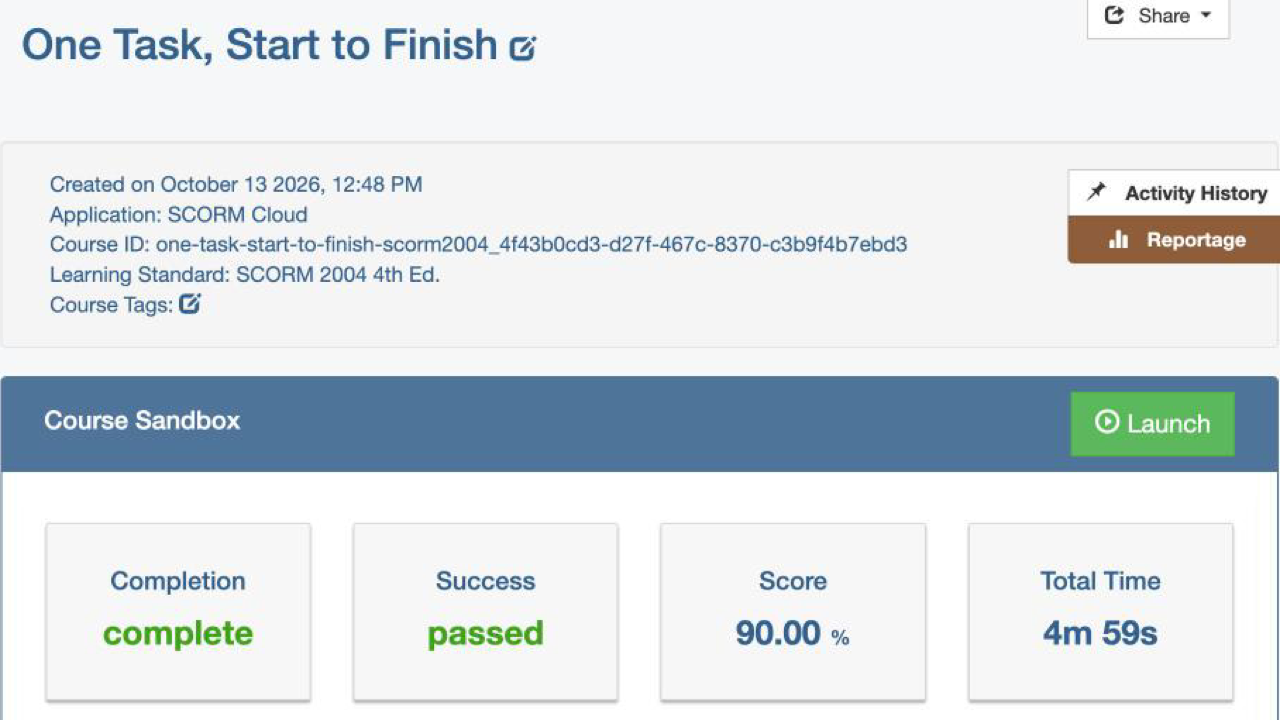
ResultIn SCORM Cloud test runs the package reported pass or fail with the score, and the whole course can be completed by keyboard alone.
What this shows
Designing for Rise 360 and its settings: locked navigation, gated checks, a scenario, a quiz, and a practice I coded in HTML and JavaScript for a Rise Code block. SCORM 2004 packaging, tested in an LMS. Action mapping.
Tools
Articulate Rise 360 · SCORM Cloud · axe-core for the accessibility scan · HTML and JavaScript for the coded practice
What’s in the course
Five steps, one practice firm, and a task of your own
Every step runs the same way. You learn it, practice it on a made-up business, then do it for real in your own Claude Code. A check opens the next step. From step 2 on, the practice follows one fictional firm, Cedar Row Architects.
Where do you start? A choice at 8:04 p.m., the five steps, and getting Claude Code open.
Step 1: Pick one task that repeats. Sort a bakery’s tasks, then write your own on a printable plan.
Step 2: Give Claude the details of the task. Sort what the firm shares with Claude and what it keeps, then have Claude interview you and write your instructions file.
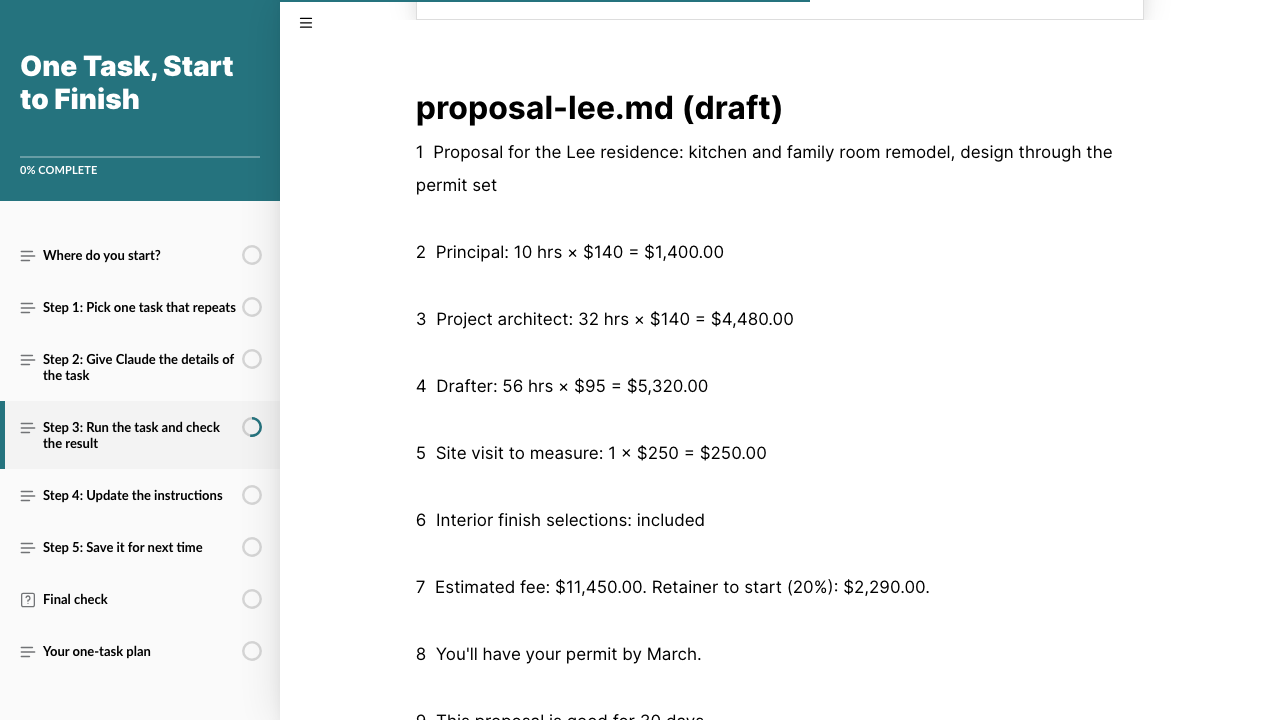
Step 3: Run the task and check the result. Choose the request in a short scenario, then answer three permission prompts in a coded practice that looks like Claude’s own. Then find the three wrong lines in a draft fee proposal.
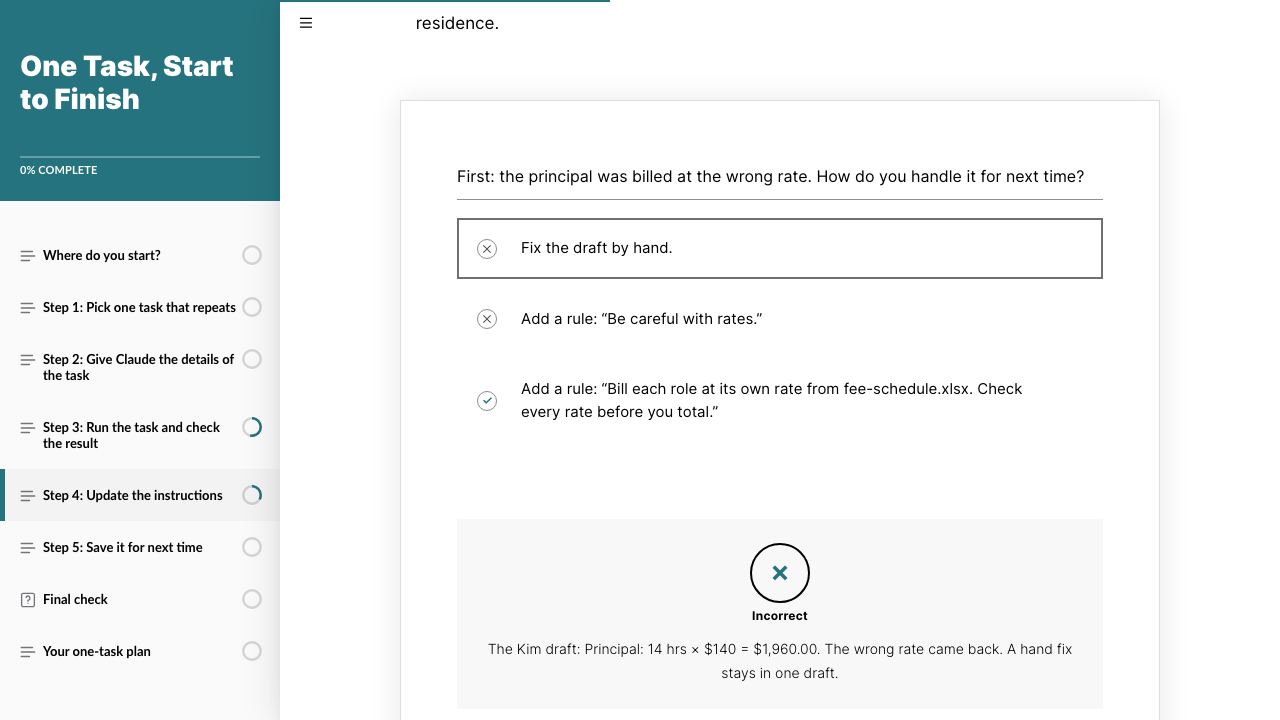
Step 4: Update the instructions. Choose a fix for each problem and see what comes back on the next client’s draft.
Step 5: Save it for next time. Save the task as a skill and run it by name.
Final check. Ten questions, two per step. Score 90% to pass, with unlimited retakes.
Your one-task plan. The plan and a one-page job aid to download, and two survey questions.
If you have five minutes
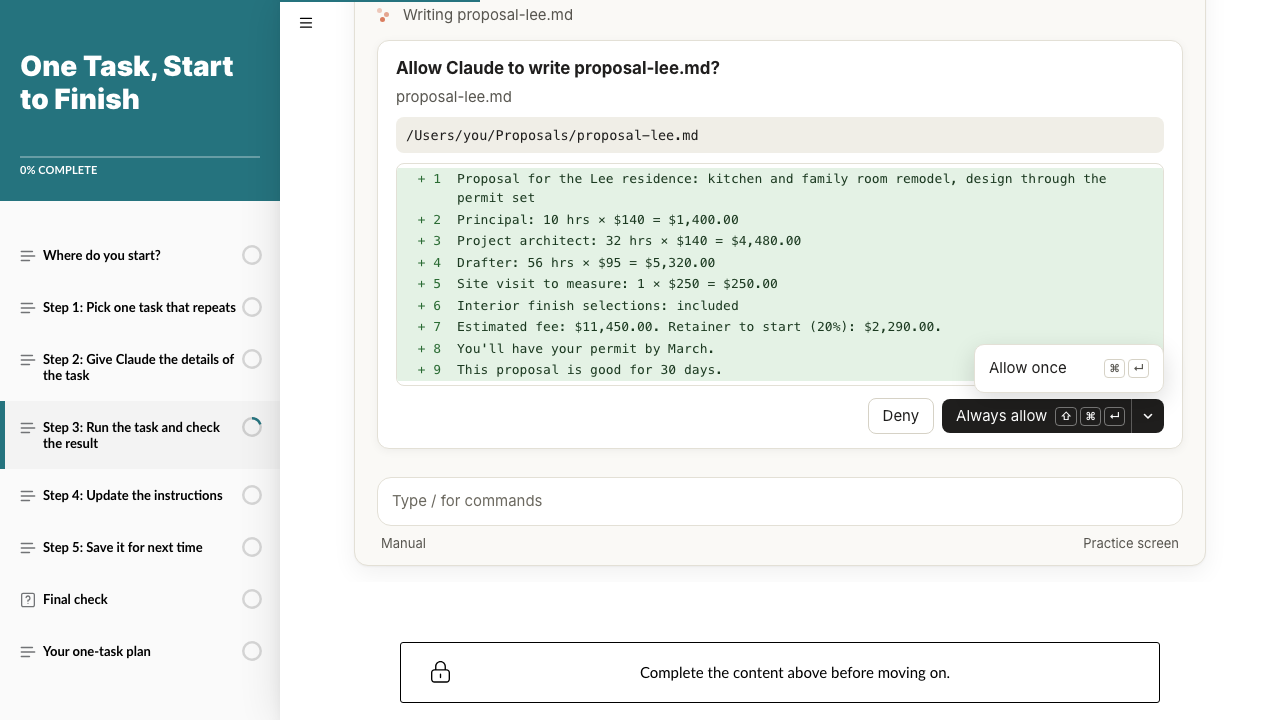
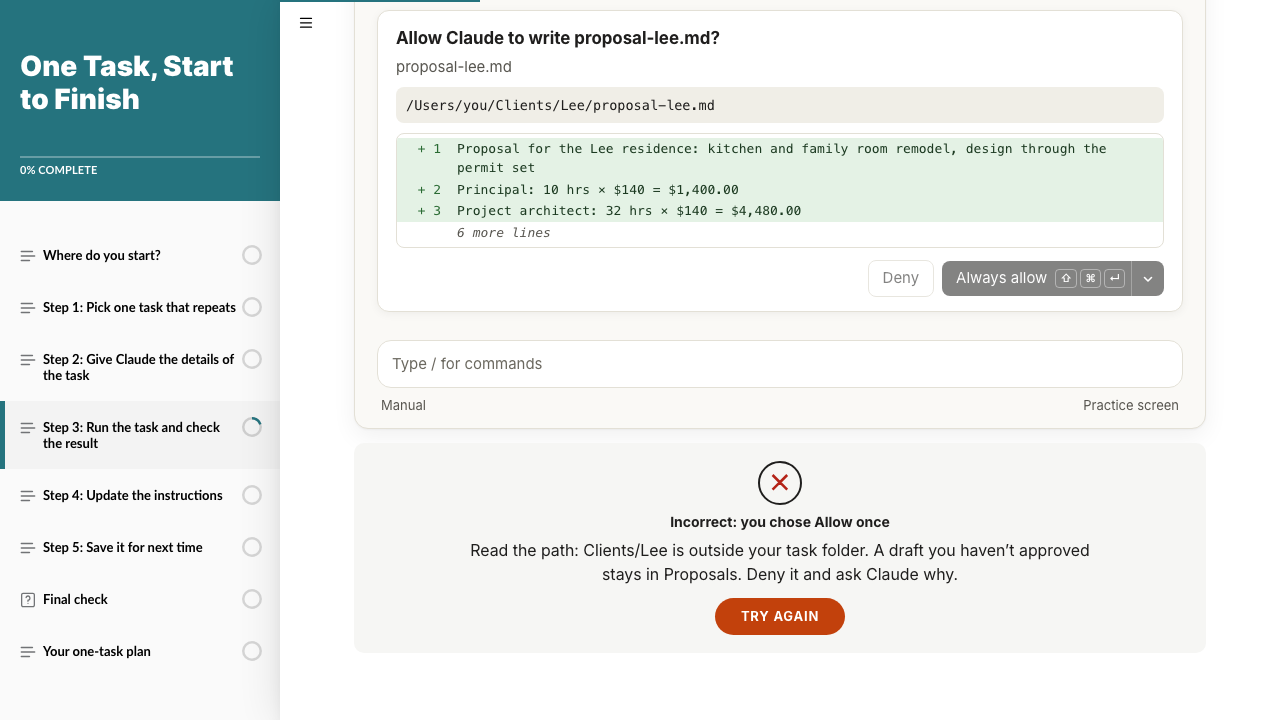
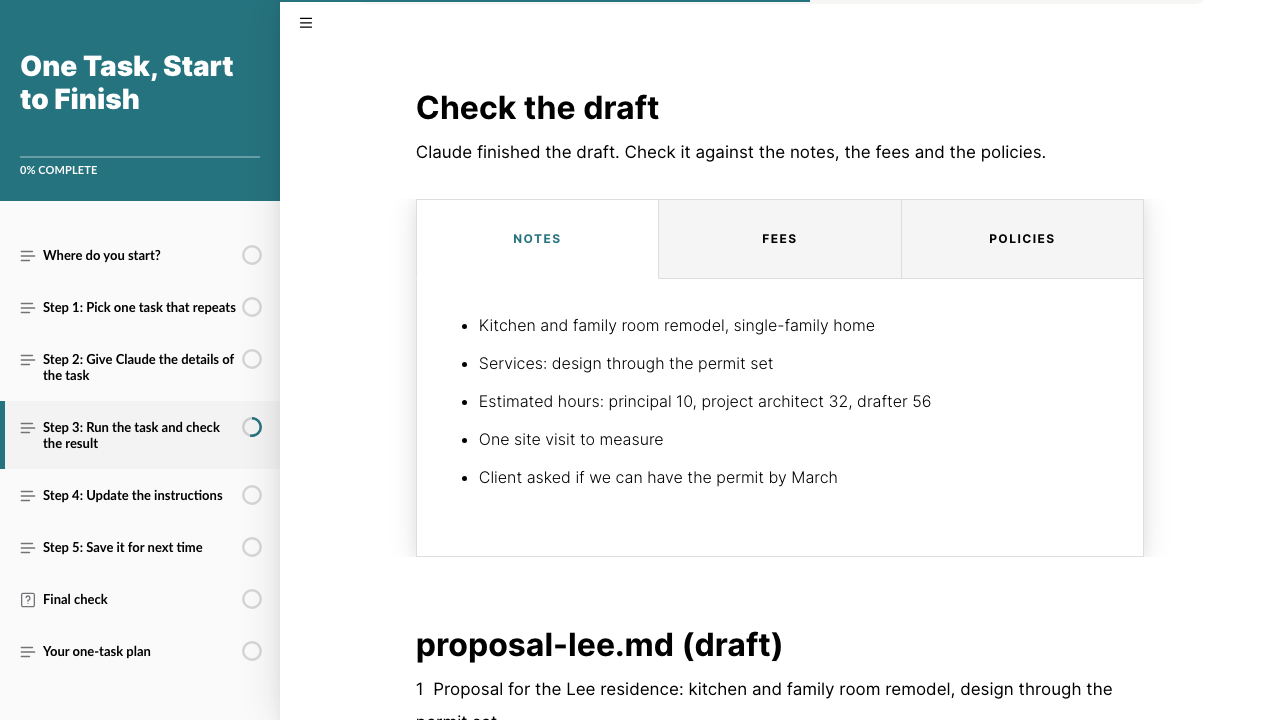
Open step 3, choose the request in the short scenario, then answer three permission prompts in a practice I coded to look like Claude’s own. The first hides the right answer in a menu, and the last uses the same file name in a different folder. A wrong choice shows what it would cost, and you try again. When you finish, the draft check opens: the client’s notes, the fee schedule and the policies in tabs, above a draft proposal with three lines to catch. Then open step 4 and pick a wrong fix on purpose to see what comes back. Learners unlock lessons in order; these links skip ahead.
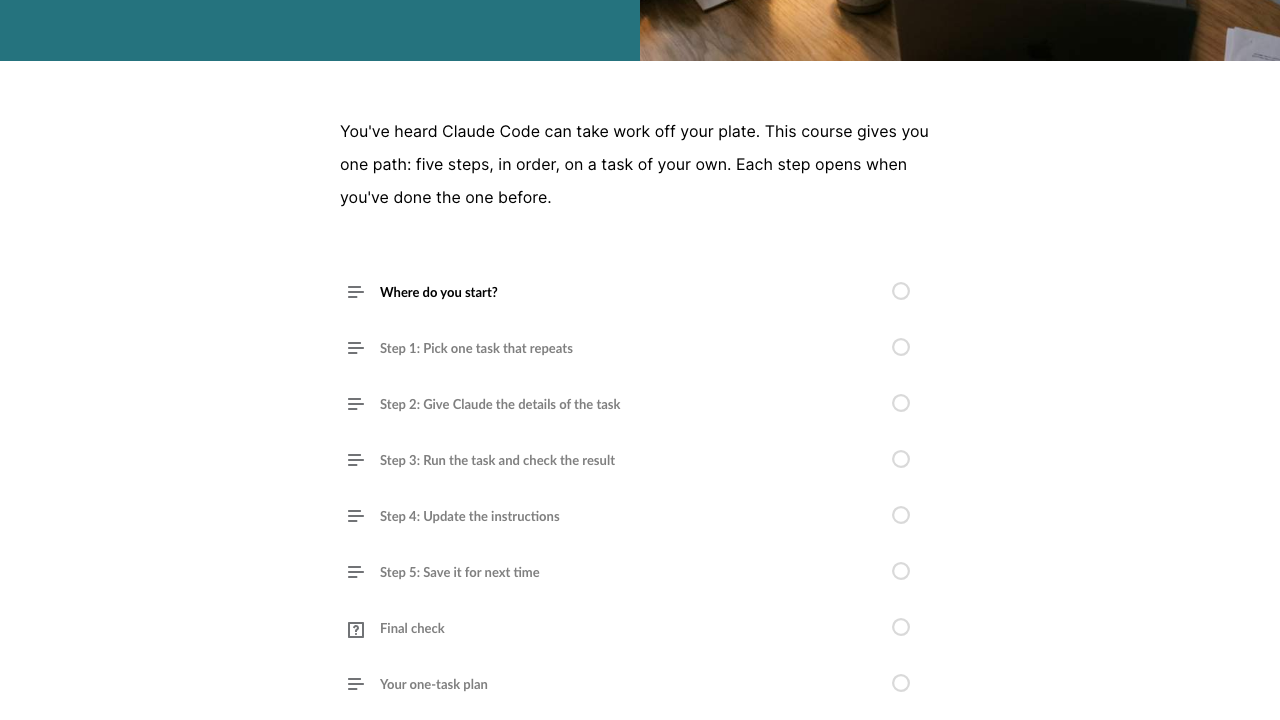
Locked path. Later lessons stay gray until the one before is complete.A practice coded for Rise. Three prompts styled after Claude’s own. The right answer to the first sits in the menu next to Always allow.Read the path. The last prompt reuses the file name in a folder outside the task, so only the path gives it away.The source details. The client’s notes and the firm’s rules sit in tabs above the draft.The draft. Three of its nine lines need fixing before the owner approves it.Feedback that shows the next project. A hand fix or a vague rule brings the problem back on the next client’s draft.
The real thing: Claude Code on a demo folder
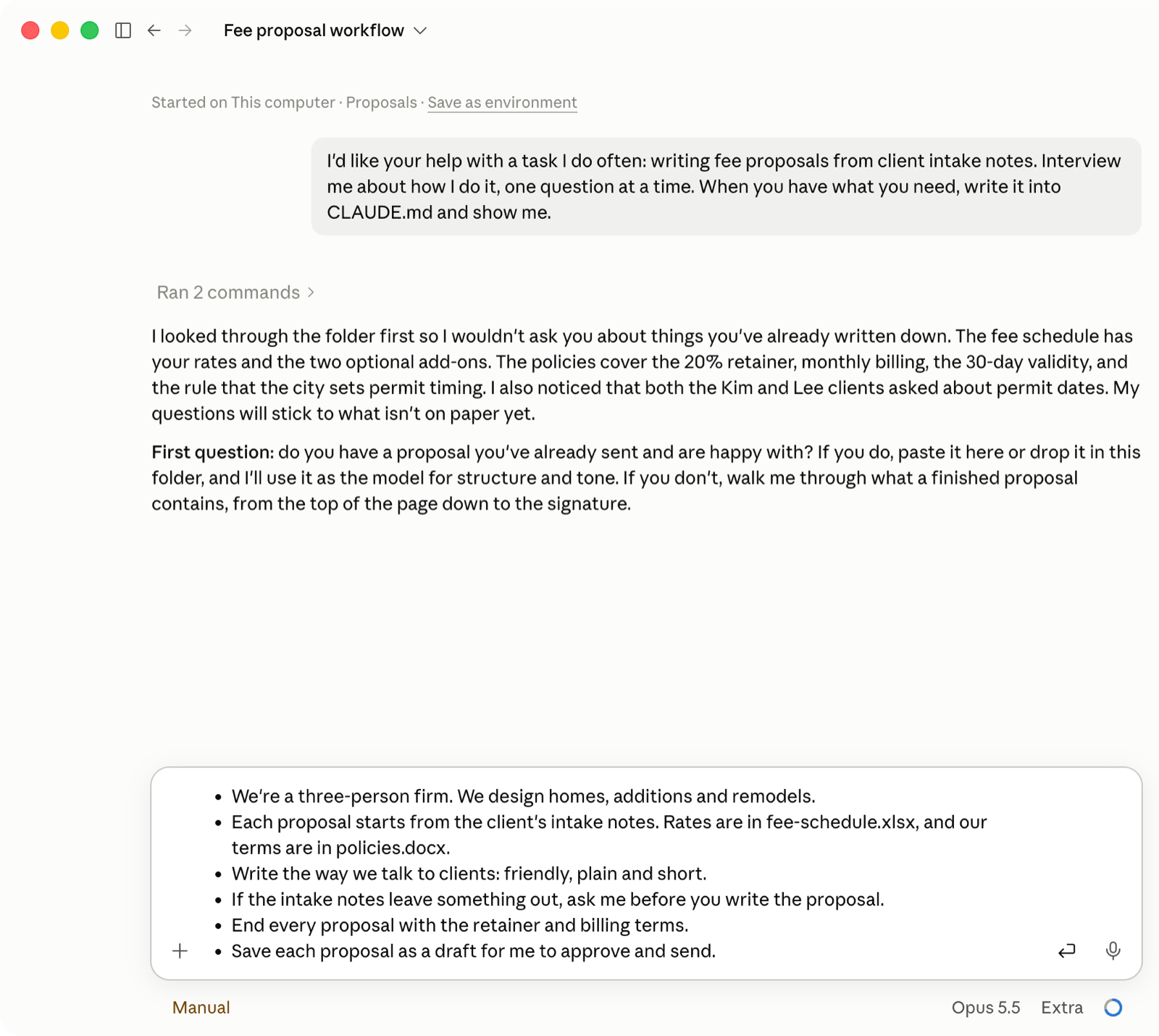
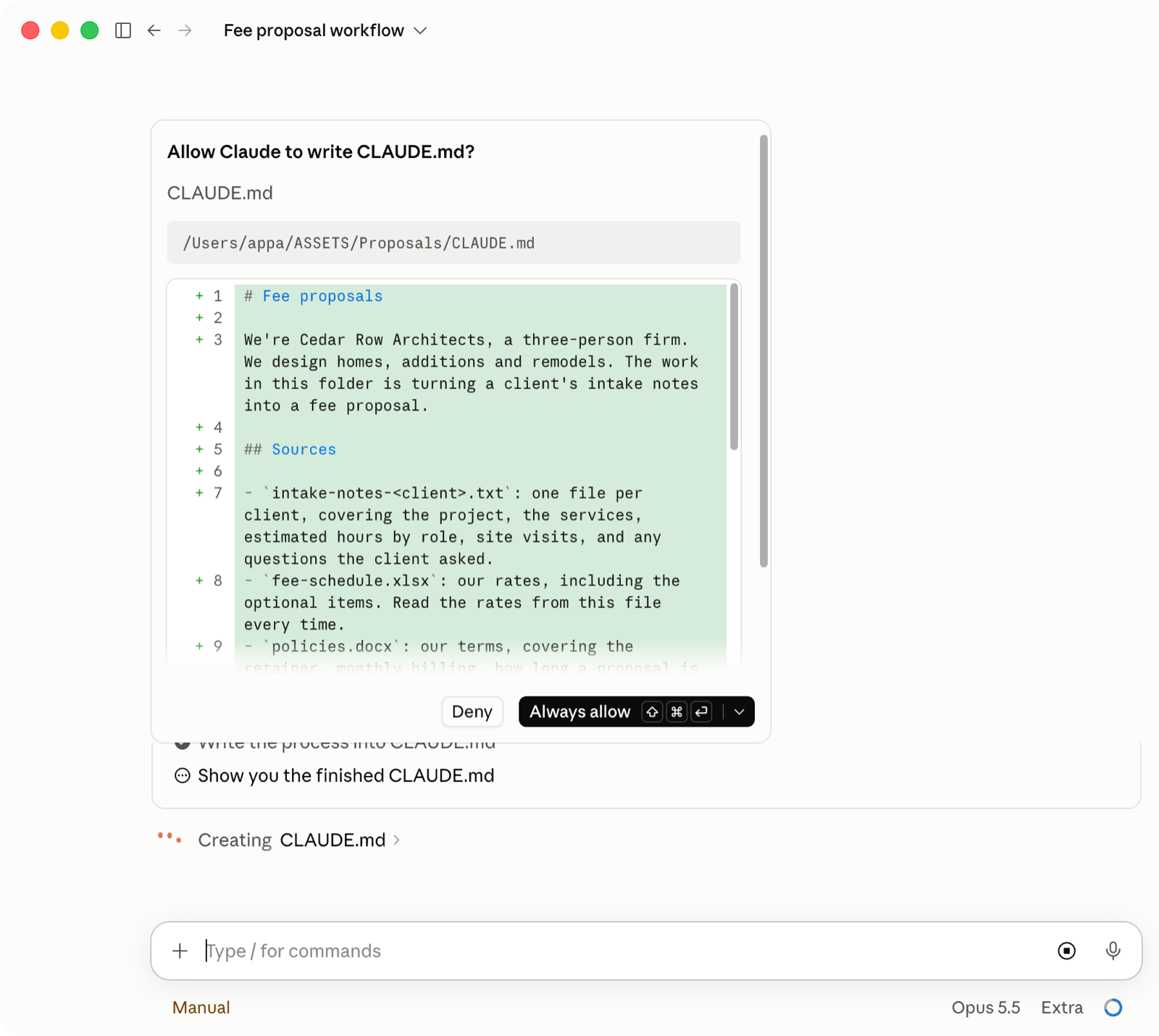
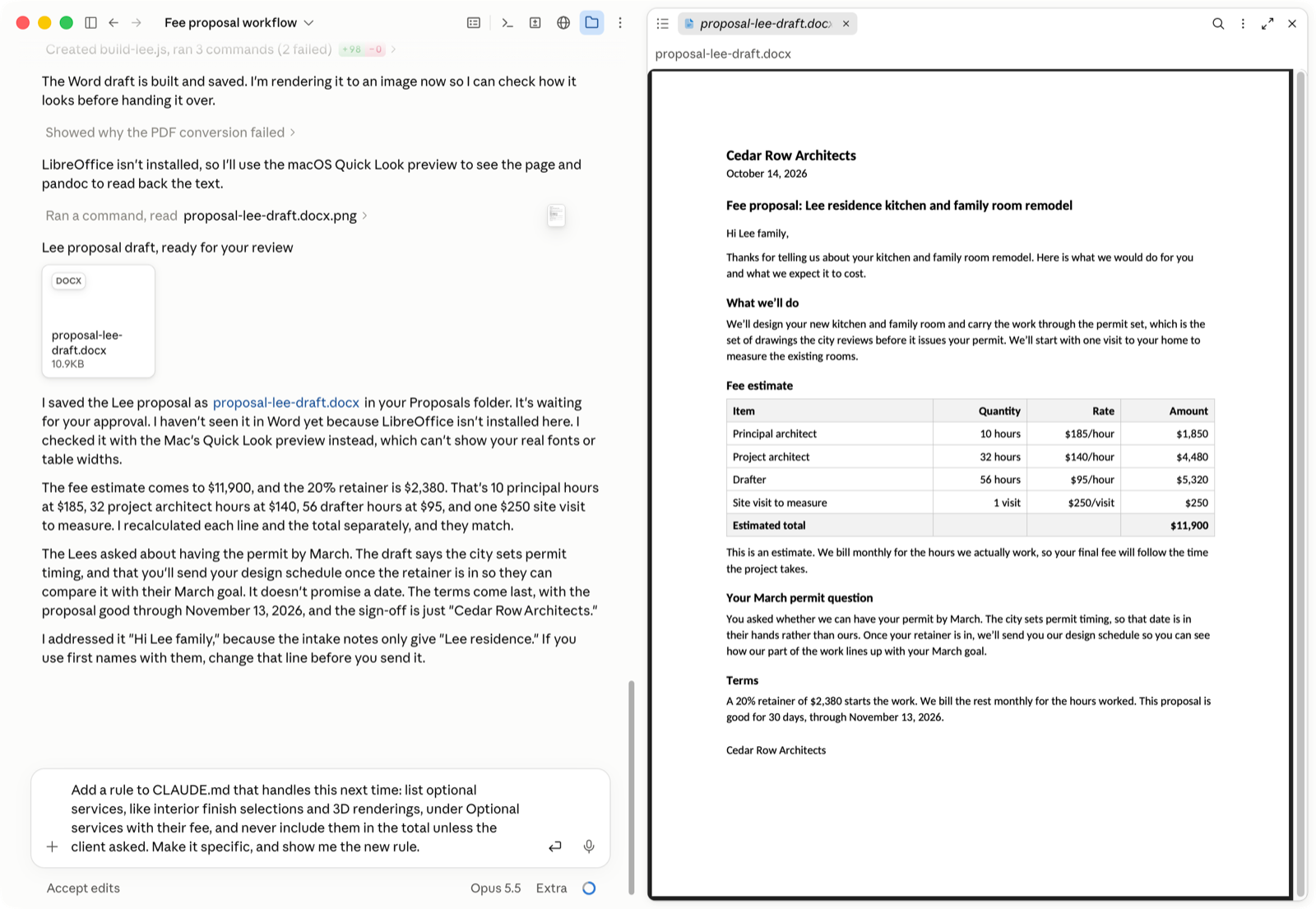
The practice above is built in Rise. These are real screens from the Claude desktop app, taken on 2026-10-14 with the course’s own prompts, in a demo folder that holds the same fictional firm.
Step 2, the interview. Claude reads the folder first, then asks one question at a time.A permission prompt. Claude asks before it writes the instructions file and shows what it will save.Step 3, the draft. Every rate comes from the fee schedule. The owner still reads each line before approving it.Step 4, a new rule. Claude writes the Optional services rule into CLAUDE.md as steps it follows on every proposal.Step 5, run by name. In a new session, /proposal and the intake notes start the saved steps.
Action map
From the goal to the practice
Business goal
Owners who finish the course hand a repeating task to Claude Code and are still running it a month later.
Measured by a short follow-up at 30 days. There is no baseline or target yet; both would be set from the first group of learners.
Behavior 1
Picks one task that repeats
Names a daily or weekly task that passes their desk before a customer sees it.
Practice
Sort a bakery’s six tasks into good first tasks and later
Write their own task on the plan
Minimum information
The four marks of a good first task
Behavior 2
Gives Claude the details of the task
Sets up a folder with an instructions file (CLAUDE.md) that holds the steps, the rules and an example.
Practice
Sort what the firm shares with Claude and what it keeps
Have Claude interview them and write their CLAUDE.md
Minimum information
Claude Code works in a folder and reads CLAUDE.md every time
Claude can interview you
Behavior 3
Runs the task and checks the result
Reads every permission prompt, and every line of the draft, before approving it.
Practice
Choose the request and answer two permission prompts
Find the three wrong lines in a draft proposal
Run their own task once
Minimum information
Ask plainly; read the prompts; compare every number, then look for promises and additions
Behavior 4
Updates the instructions
Turns what was off into a specific rule, then runs the task again.
Practice
Choose a fix for each of three problems and see the next draft
Add a rule for what was off in their own run
Minimum information
A hand fix stays in one draft
Vague rules versus specific ones
Behavior 5
Saves it for next time
Saves the task as a skill, runs it by name and approves each result.
Practice
Choose the request that saves the skill
Save their own skill and set a reminder
Minimum information
A skill is a saved set of steps with a short name
The owner’s approval stays
Each behavior has a lesson, practice on the fictional firm, a real step in the learner’s own Claude Code and a check. Feature tours and coding were left out because no step needs them. Full action map in the design document.
Objectives
What the owner can do by the end
O1Given their own business, name one task that repeats daily or weekly and passes their desk before a customer sees it.Behavior: picks one task
O2Set up a task folder in Claude Code with a CLAUDE.md that holds the task’s steps, rules and an example, sharing only what the task needs.Behavior: gives Claude the details
O3Given a draft from Claude and the source details, find every line that differs, including added services and promised dates, before approving it. Criterion in the practice: all three problems found.Behavior: runs and checks
O4When a result is off, write a rule specific enough that the problem stays fixed on the next run.Behavior: updates the instructions
O5Save the task as a skill, run it by name, and approve the result.Behavior: saves it for next time
In the course, each objective is practiced with choices on the fictional firm and checked by the step’s question. The real version happens in the learner’s own Claude Code, which the course can’t see.
Design decisions
Five choices that shaped the course
1. A locked path, with a check at every step
Chosen
Rise’s restricted navigation. After each step’s check, the Continue button appears only once the answer is right, and the plan lesson opens only after a passing final check.
Turned down
An open menu where learners pick any topic. Owners already have plenty of content with no order to it. The order is what the course adds.
The tradeoff I made
The menu won’t let anyone jump ahead, including a reviewer or a returning learner. For reviewers, this page links straight to steps 3 and 4.
2. Built in Rise, not Storyline
Chosen
Rise 360, which runs in a browser.
Turned down
Storyline, my original plan. The storyboard called for variables carried across scenes, a mock Claude Code screen, and fixes in step 4 that change the next project’s draft. Storyline runs only on Windows, and I build on a Mac.
The tradeoff I made
Rise has no variables, so the learner’s own task can’t follow them through the course. They write it on a printable plan instead, and the effect of each fix shows in the feedback rather than a scene later.
3. Feedback that shows the next project
Chosen
In step 4, each choice shows what the next client’s draft looks like. A hand fix or a vague rule brings the problem back. A specific rule holds.
Turned down
Plain right-or-wrong feedback. The lesson is that a fix carries forward only when it’s in the instructions, and “Correct” can’t show that.
4. A 90% pass mark
Chosen
90% on ten questions, two per step, with unlimited retakes and shuffled questions.
Turned down
The 80% I first set. With two questions per step, 80% lets a learner miss a whole step and still pass.
The tradeoff I made
A learner can miss only one question. Retakes are unlimited.
5. A coded practice inside Rise
Chosen
A Rise Code block with three permission prompts I built in HTML and JavaScript to look like Claude’s real prompt, menu and all. It tells Rise when the learner finishes, so the lesson’s Continue waits for it.
Turned down
Rise’s scenario block for these decisions. It shows text choices, so learners never practice finding Allow once in the menu or reading a path.
The tradeoff I made
Custom code needs its own accessibility testing, and it has to be updated when Claude’s prompt changes.
Process artifacts
The working documents
Design document
Problem, audience, the full action map, objectives, design decisions and the measurement plan. Written for the Storyline plan.
Claude Code, Codex, Gemini and local AI models were used at different steps of my process.
Results
The package works in an LMS.
Failing attempt in SCORM Cloud: 8 of 10, reported as failed with a score of 80Test run on 2026-10-13, on an earlier export of the same course, going straight to the quiz. It shows the package reports pass or fail with the score. It is not learner data. With pass/fail reporting, a failed attempt still marks the course complete, which an LMS admin should know.
Simulated
Passing attempt in SCORM Cloud: 9 of 10, reported as passed with a score of 90Same test run, after a retake.
Simulated
Survey answers stored in the LMS as two interactionsTwo test answers, checked in SCORM Cloud’s report.
Simulated
SCORM Cloud, test run. The test registration after the passing retake.
What would be measured
Reaction comes from the two survey questions at the end. They sit after the passing score, so learners who stop early never answer them. Learning comes from the final check score, reported through SCORM. A follow-up at 30 days would ask whether the saved task is still running and how much time it gives the owner back each week, in their own words. Measurement plan in the design document.
Reflection
What Rise couldn’t do, and what’s next
What didn’t work
The lock isn’t airtight. Typing a later lesson’s address opens it, in the preview and in the export.
The real-work steps run on trust. The course can’t see the learner’s own Claude Code.
What I’d change next
Build the Storyline version on Windows, so the learner’s task follows them through the course and the step 4 fixes play out a project later.
Watch a few owners take it and see where setup stalls.
Run the screen-reader pass with VoiceOver.
Hiring for instructional design or AI training?
Tell me about the role or the project, and what the people you train need to do differently.