Email Dean
Menu

Portfolio

Case study · Workplace safety · Hawaii

Property crew safety training, rebuilt to teach, then test

For maintenance techs, groundskeepers and property managers at a property company.

Portfolio redesign of an existing course · How AI was used

  1. ProblemThe original course was eight screens about the law and one recall question. It would not change what a worker does when the crew is waiting and a senior coworker says to tape the cord.
  2. BuiltFive slide-based lessons on shock, fire, falls, heat and speaking up. Each teaches, then makes you do it: sort cords, write a report, answer a veteran who pushes back. A scored test ends it.
  3. ResultEvery legal claim was checked against its source, and five of the original’s thirteen failed.

What this shows

  • Action mapping and root-cause analysis: starting from behavior, not topic
  • Teach, practice, then test: lessons with diagrams drawn for the content, production practice, scenes, and a diagnostic test that cannot be gamed by answer length
  • Checking legal and safety content against primary sources, including the original course
  • Hand-built, accessible HTML and JavaScript

Tools

Action mapping (Cathy Moore) · LTEM · HTML, CSS and JavaScript, no framework · xAPI-style tracking · axe-core

About 60 minutes in six sittings, on a phone or a computer. In a hurry? Open any lesson from the training map, or unlock the test there.

The problem

Hazards get seen and worked around

A property crew works in tenants’ homes and on shared grounds: extension cords, ladders, solvents, open railing edges, midday sun. Most of what goes wrong there is not a mystery. Someone saw the hazard and worked around it, because the crew was waiting, or a senior coworker said it was fine, or reporting felt like making a fuss.

That is the business’s problem, not a training topic. Under HRS §396-6(a) an employer must furnish a place of employment “safe as well as free from recognized hazards.” Under HAR §12-60-2(g) a worker who knows of an unsafe condition must promptly tell the supervisor, and the supervisor must then act. When that chain breaks, people get hurt and the exposure sits with the employer.

Public evidence that these are the hazards to worry about: HIOSH’s list of its ten most serious cited standards for fiscal year 2025 has four electrical entries, two fall-protection entries, a ladder standard, and the general duty rule. That is statewide and covers every industry HIOSH inspects, so it shows which hazards HIOSH finds. It does not describe any one company’s record.

What version 1 was

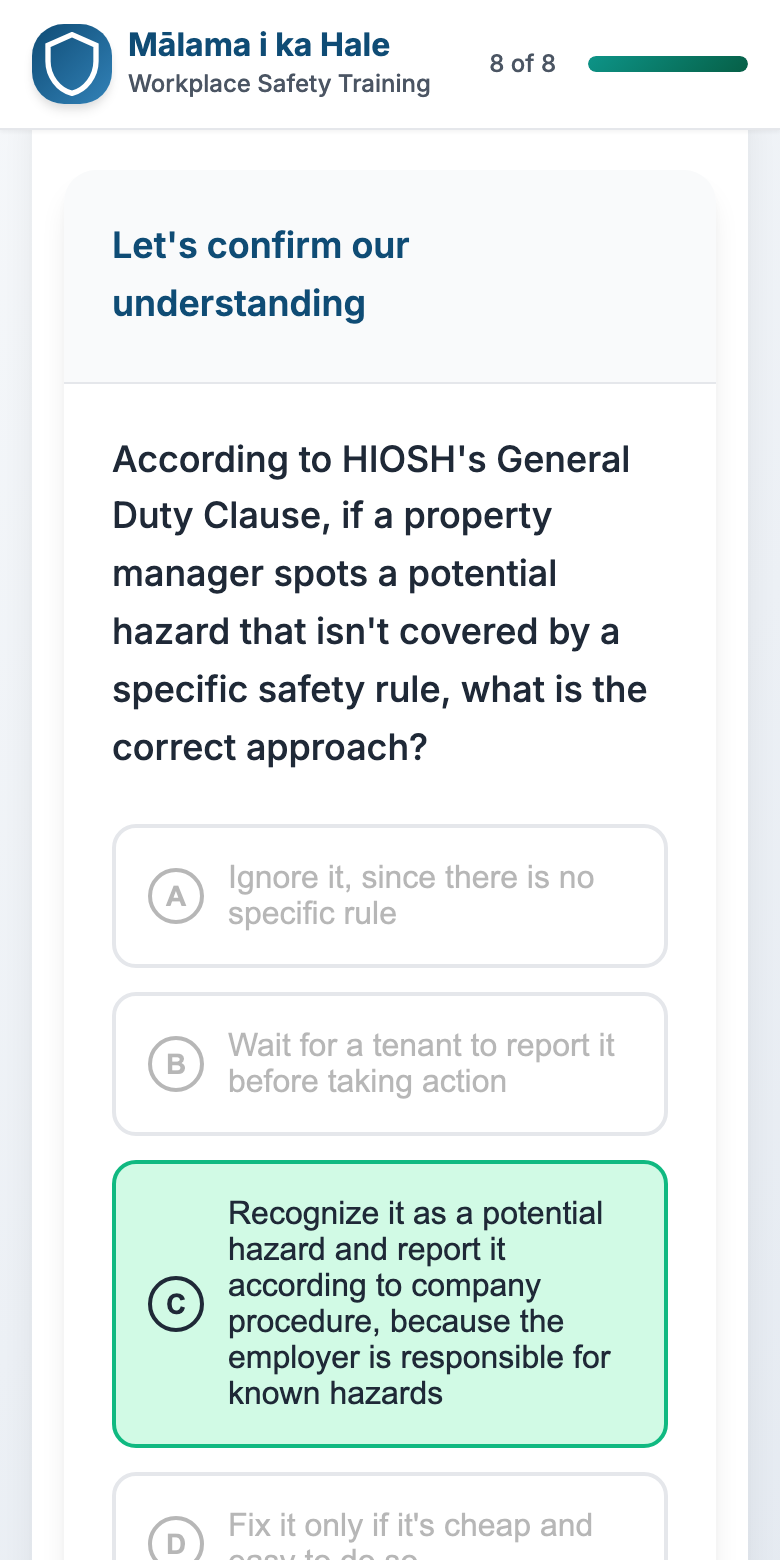
The original course is eight screens: a title, objectives, a leadership letter, three screens on the legal framework and duties, a summary, and one multiple-choice question. It talks about the law. It never teaches a worker what a damaged cord looks like or what to do about it, and its one question can be passed by picking the longest answer. See it in the side-by-side.

Where training can help, and where it can’t

Training fixes gaps in knowledge and skill. It does not, on its own, fix gaps in motivation or environment. Each gap below was checked for its cause. These are stated assumptions to confirm with a real client, not findings.

Keeps using a damaged cord

CauseKnowledge, motivation, environment. Not everyone knows tape is not a repair. The crew is waiting, and the spare cord is far away.

What fixes itA lesson on what to look for, GFCI and wet places, and how to take a cord out, with a timed sort of five cords. The company stocks spare cords and tags and backs the person who stops the job.

Works near solvent and a pilot light

CauseKnowledge, some skill. Talking to a tenant about it is its own skill.

What fixes itA lesson on fuel and flame, and a scene. The company decides and communicates a storage rule.

Doesn’t stop a coworker at an open edge

CauseMotivation, skill, environment. How do you say “stop” to someone with twelve years on you, and is the gear on site?

What fixes itA lesson on edges, a sentence builder to rehearse “Hold up,” and two rounds of pushback from a veteran to practice holding the line. Culture and equipment belong to the company.

Doesn’t report, or reports vaguely

CauseKnowledge, environment. Nobody said what a useful report contains, and reports have vanished before.

What fixes itA four-part report, taught in every lesson and written by the learner. The company provides an easy channel and a same-day reply.

Misses or ignores heat illness

CauseKnowledge, motivation, environment. The signs are non-specific, and nobody wants to be the one who quits.

What fixes itA lesson on the signs, the response, and the first week. The company provides shade, water, and a plan for new workers.

So the training is paired with five low-cost company actions: spare cords and “Do not use” tags on the truck, a hazard-report channel that works from a phone in under a minute, a same-day reply to every report, written support for stopping a job, and a first-week plan for new outdoor workers. Without them, expect completions, not change. The full analysis is in the needs analysis.

Audience

Who takes it, and what they bring

These are assumptions. No client data was supplied, so they are written down to be confirmed, not presented as findings.

Who

Maintenance technicians, groundskeepers and property managers at a mid-size property company. Some have a decade on the job; some have three weeks.

What they already know

The trade. Not always the reasons: that tape is not a repair, what an anchor must hold, what the signs of heat stroke are. That is why the training teaches before it tests.

What they’re up against

A phone, not a desk. Sun glare, gloves, interruptions, weak signal in stairwells. Often no supervisor in the building. Time pressure, and a senior coworker’s “it’s fine.”

The property, the people and the events in the training are fictional: Marcus the supervisor, Ray the veteran, Mr. Baker the tenant, Daniel the new groundskeeper. The training says so on its first screen. It is written in plain English, with no Hawaiian-language words, and names no city, and keeps the rules real: federal OSHA’s and Hawaii’s.

Action map

From goal to practice

Start from a measurable business goal, list the behaviors on the job that move it, give each behavior something to learn and something to practice, and add only the information that practice needs. Everything else is cut.

Business goal

More hazards are reported and fixed before anyone is hurt.

Measured by hazard and near-miss reports per 10 workers, how complete they are, and how fast they arrive. Baseline: none supplied. Target: set from a 60-day baseline. Projected
  1. Behavior 1

    Stop it

    Take a damaged cord out of service. Leave a pilot unlit near solvents.

    Taught (lessons 1 and 2)
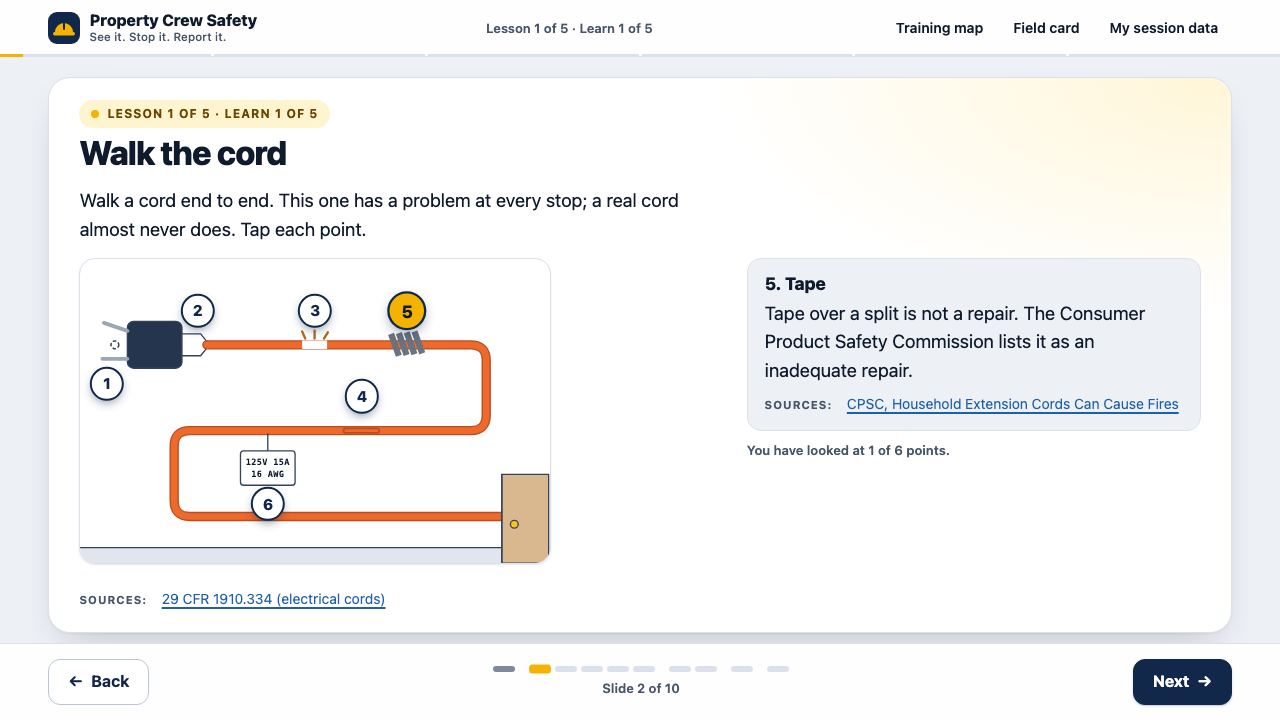
    • Walk a cord end to end: six things to check
    • Water, GFCI, wet hands
    • Fuel plus a flame; how to read a label
    • The steps to take it out or step away; a strong smell means 911
    Practiced and tested
    • Sort five cords: use it or tag it
    • Scenes: a frayed cord and a coworker who says “tape it”; solvent beside a water heater
    • Test: find the hazards in a bathroom and two closets, with no markers; new scenarios
  2. Behavior 2

    Speak up

    Stop a coworker at an open edge. Stop yourself when your body says so.

    Taught (lessons 3 and 4)
    • Spot an unprotected edge
    • Three ways to protect it; anchor, body harness, connector; a ring on a wall is not an anchor until someone approves it
    • Build a “Hold up” sentence, then hold it through two rounds of pushback
    Practiced and tested
    • Scenes: a senior coworker leaning past an open balcony edge; your own headache and nausea
    • Test: two balconies to search; a roof edge; a balcony you are told to lean over; a wall ring nobody approved
  3. Behavior 3

    Report it

    Same shift, four parts: where, what, how bad, what I did.

    Taught (every lesson, then lesson 5)
    • A weak and a strong report for each hazard
    • The duty runs both ways
    • What protects you; who to call
    Practiced and tested
    • Write two reports from scratch, in four boxes, and compare each with a model
    • Scenes: the text to the supervisor, a tenant, a coworker who asks you not to tell, a report with no reply
    • Test: pick the message a supervisor can act on, and what lesson 5 teaches, for each hazard
  4. Behavior 4

    Respond to heat illness

    Cool, call 911, stay.

    Taught (lesson 4)
    • The signs, and which mean call now
    • Cool, call, stay
    • Water, rest, shade; the Rule of 20 Percent for a new worker
    • Heavy sweating does not rule heat stroke out
    Practiced and tested
    • Scene: a second-day groundskeeper, confused, says he is fine
    • Test: who needs 911 now; who is at higher risk; three scenarios

The shape: four hazards, three moves

The behaviors fall into a grid a worker can carry in their head and on one page. Each of the twelve cells is taught, practiced, tried in a scene, and tested, with two or three versions of each test question. The same grid is the training map, the test blueprint, the results screen and the printable field card.

The 12 skills
HazardSee itStop itReport it
ShockSpot a damaged cordUnplug, tag, take it outThe four-part report
FireSpot fuel and a flame togetherLight nothing, air it out, step awayReport without judging the tenant
FallSpot an unprotected edgeSay “Hold up” and keep the work stoppedFacts about the situation, not the person
HeatSpot the signs without diagnosingCool, call 911, staySay it on the phone

What was cut from the original because no behavior needs it: the title and objectives screens, the full leadership letter, the legal framework screen, the duties table, and the recall quiz. The reasons are in the action map and the design document. The gap named on purpose: ladders and lockout are not covered.

Objectives

What a worker should be able to do

Each objective names a condition, an action verb and a criterion, and each comes from a behavior on the map. The full list adds the smaller things each lesson teaches so the learner can reach these, and where the training and a 30-day on-the-job check would each measure them.

  1. O1Given a damaged extension cord about to be used, remove it from service (unplug, tag, take it out) before work continues.Behavior: Stop it
  2. O2Given solvent or fuel beside a gas water heater, leave the pilot off, ventilate, and notify the supervisor before any ignition source is used.Behavior: Stop it
  3. O3Given a coworker leaning past an unprotected edge above 6 feet, say “Hold up,” hold it through pushback, and keep the work stopped until fall protection is in place, or step back and call.Behavior: Speak up
  4. O4Given your own early heat symptoms, stop, tell a supervisor or crew lead, and move to shade with water.Behavior: Speak up
  5. O5Given any hazard, send a report with all four parts before the end of the shift.Behavior: Report it
  6. O6Given a tenant who says a hazard has always been there, state it in one sentence, request one action, and hand enforcement to the supervisor.Behavior: Report it
  7. O7Given a coworker who asks you not to tell, report the practice the same day, factually.Behavior: Report it
  8. O8Given a coworker with confusion or slurred speech in the heat, move them to shade, start cooling, call 911, and stay with them.Behavior: Respond to heat illness
  9. O9Given a report that gets no reply, make it safe, follow up in writing the same day, and go up a level before going outside.Behavior: Report it
  10. O10After the training, choose one first move and apply it during the next week.Transfer

No objective asks a worker to explain the General Duty Clause, which the original opened with. A worker who can stop a cord, stop a coworker and write a four-part report is doing what the law asks, whether or not they can cite the section.

Design decisions

Eight choices, and what was turned down

1. Teach first, then test

Chosen
Five lessons, each in the same order: learn (short slides, with a diagram or a picture you tap through), practice (one or two short checks, not scored), prove it on the job (a scene where you decide and see what happens), and a scored test at the end. When a learner returns after a day, three warm-up questions about earlier lessons bring them back.
Turned down
Scenes alone, which is what the first build of this redesign was. It jumped from a two-line welcome into decisions. It tested what a learner already knew and taught nothing, and the first person to look at it said so. Also turned down: the original’s order of three screens of law, then one question.

2. One grid that organizes everything: four hazards, three moves

Chosen
Shock, fire, fall and heat, each taught as see it, stop it, report it. Twelve skills. The grid is the training map, the test blueprint, the results screen and the printable field card, so a worker learns one shape and meets it everywhere.
Turned down
Organizing by regulation or by a list of topics. A worker does not think in sections of a statute. They think “that cord looks bad.”

3. Teach the eye with pictures you tap through, then test it as a search

Chosen
Four annotated pictures: a cord laid out end to end, a utility closet, a balcony, and a product label. In the closet the learner first says what each point is (fuel, a flame, something that traps vapor, a warning sign), sees whether they were right, and only then reads why. The test pictures have no markers at all. The learner taps the objects they think are a problem, each tap area is invisible and sits on the object, and the decoys are real: a fire extinguisher, a sound stretch of railing, a neat coiled cord. A missed hazard costs more than a false alarm, and tapping everything scores half.
Turned down
Numbered markers on the test pictures, which is what the second build had. The hazards were always numbers 1 to 5 and the harmless items 6 and 7, and at phone size the markers covered the very objects being judged. Also turned down: bulleted hazard lists, which are easy to read and easy to forget, and stock photographs, which would have meant licensing and no control over the frame.

4. A test that diagnoses

Chosen
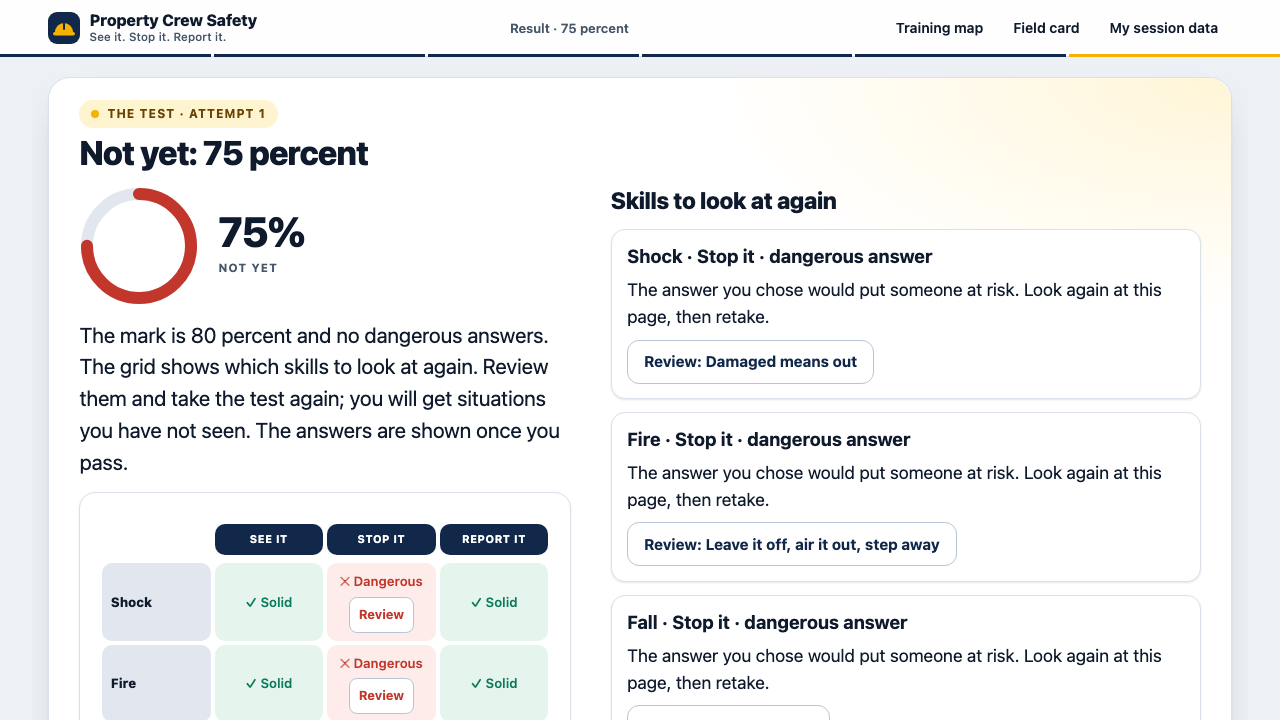
Twelve questions, one for each of the twelve skills, drawn from a bank of 32 so a retake is a different test: every situation is new, none repeats a lesson scene, and lesson 5 is tested. Option lengths are balanced and counted by script. Partial credit goes only to a sensible but incomplete answer. A dangerous half-measure scores zero, and a dangerous answer cannot pass, whatever the percent. The answers stay hidden until the learner passes, so a retake cannot be a memory test of the answer sheet. At the end, a grid shows each skill as solid, partly, review or dangerous, and each one opens the lesson page that teaches it.
Turned down
One long random quiz and one number, which tells a worker they failed, not what to do about it. Also the second build’s test: its best answer was the longest on 14 of 16 questions, so a learner with no safety knowledge could pass by picking length. That is the flaw this analysis criticizes in the original, and it came back.
The tradeoff I made
One question per skill makes the grid a coarse reading. A skill measured once can be missed by bad luck, and a strong worker can guess one right. I took that to keep the test near ten minutes and the grid readable at a glance. The “dangerous answer” rule is my reading of what a safety professional would call a critical error, and I have not had one confirm it. With a real client I would add questions per skill, run item analysis on real answers, and have a safety professional sign off every flag before trusting any single cell.

5. Plain HTML and JavaScript, not a course-authoring tool

Chosen
Hand-built pages: no framework, no build step, no fonts or scripts from another site. It loads fast on a weak signal and works offline once loaded. All content sits in two data files, and the storyboard is generated from those same files so the two cannot drift. Every screen has its own address, and progress, the test in progress and the last result are saved, so the phone’s back button and a reload both work.
Turned down
Rebuilding in Storyline or Rise, or in React like the original’s README described.
The tradeoff I made
I gave up LMS packaging. There is no SCORM file, so a client’s LMS would not get completions from this as it stands. Tracking is xAPI-shaped and stays in the learner’s browser. I took that trade for a page a crew can open in a stairwell, and for code a reviewer can read in an afternoon. A client who needs an LMS needs a wrapper, which is not built.

6. Make the learner produce answers, not just pick them

Chosen
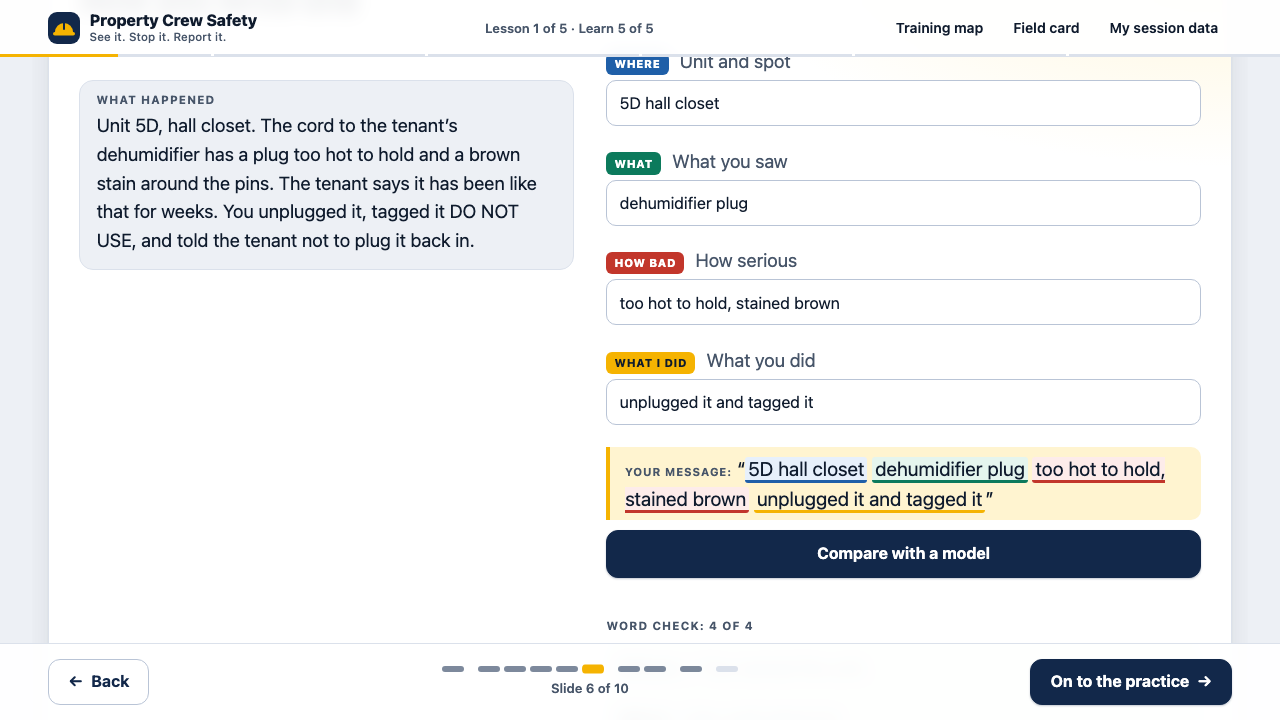
Reporting is a third of the grid, so the learner writes reports: where, what, how bad, what I did, in four boxes, compared with a model and a word check, with a link that opens the text in their own messages app. The “Hold up” practice has the veteran push back twice (“Relax, two minutes,” then “You are three weeks in”). The first lesson drills use it or tag it on five cords against the lesson’s own ten-second goal, and three of the five are fine. The field card has the same four boxes, and its supervisor number is saved on the phone.
Turned down
More multiple choice. The second build practiced the report by ticking boxes and reading a rewrite, so the learner never wrote one. A calculator for the Rule of 20 Percent and a do-and-don’t block were cut for the same reason: neither made the learner do the job.
The tradeoff I made
The word check looks for words, not sense. A message can name every fact and still be unhelpful, and the training says so beside the result. I chose a crude check the learner can see through over claiming to grade writing. Real grading needs a human rater, and the evaluation plan has one for day 30.

7. Draw the idea, and stop at about an hour

Chosen
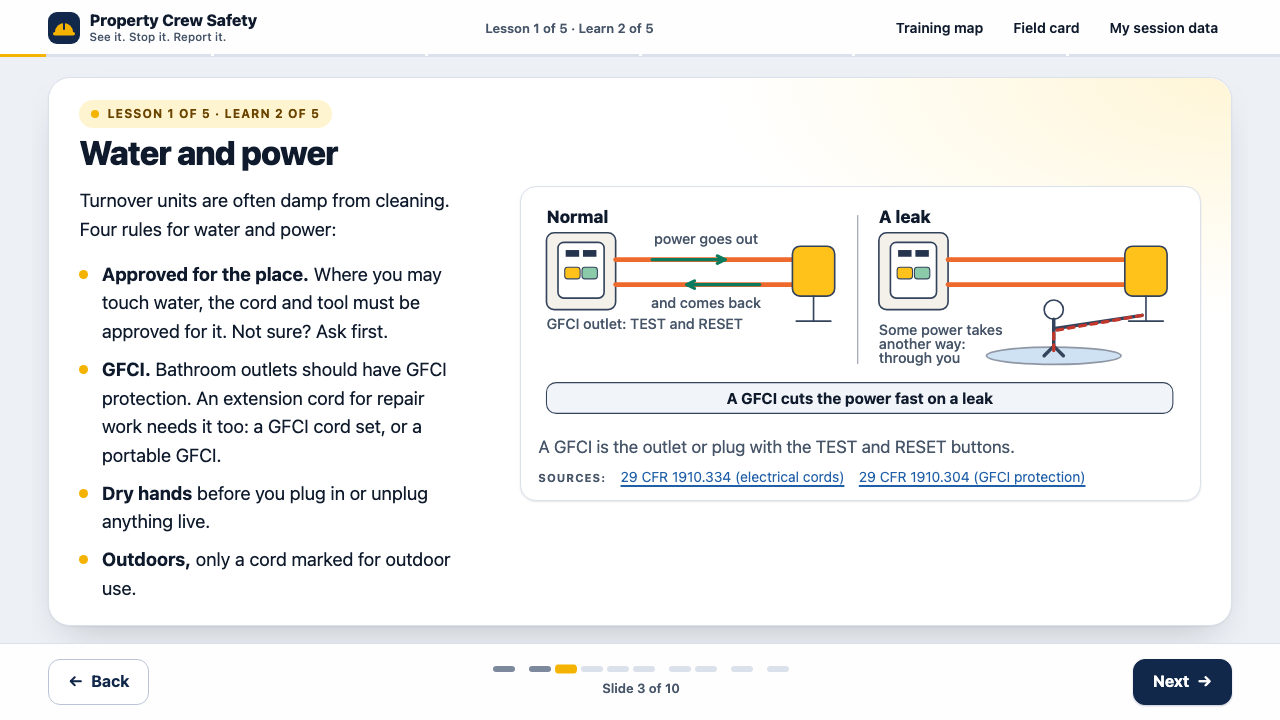
Eight diagrams and 18 small icons, drawn for this training as inline vector graphics: how a GFCI cuts the power, fuel plus a flame, what to do on a strong smell, the edge triggers and the guardrail, anchor, connector and harness, the signs that mean call 911, the Rule of 20 Percent as a bar chart, and the ladder to climb when a report goes nowhere. Each one replaced a paragraph and carries only facts already in the sources log, each has a text description for screen readers, and each was checked at phone width. The length came down from about 90 minutes to about 60 by the word-count model: the warm-ups before lessons, most practice checks that restated a page, two report pages and a page on labels were cut, and every hazard kept its see it, stop it and report it.
Turned down
Photographs and downloaded open-source images. They bring licenses and credits to track and files fetched from another site, and the training promises that nothing loads from another site. Also turned down: shortening every page a little, which would have kept all the pages and made each one thinner.
The tradeoff I made
A drawing shows the path of the current or the order of a chain, which a photograph hides, but a worker who has seen a diagram of an anchor has not seen the one on this roof. I gave up the real thing for control of the frame. The hour comes from a word count (64 minutes, from 54 at a fast reading speed to 72 at a slow one), and no learner has timed it. Public-domain OSHA and NIOSH photographs are the next place to look, after checking each license.

8. A deck of slides, the business reason first, and motion that does a job

Chosen
Each idea is a slide. On a computer the text is on the left and the picture or the thing to do is on the right; on a phone the same slide stacks into one column. Back and Next sit in a bar that never moves, the arrow keys work, and a row of ticks shows where you are. Five introduction slides come before the first lesson: who it is for, the company’s goal (more hazards reported and fixed before anyone is hurt) with what the worker and the company each do about it, four ordinary moments where it goes wrong, the three moves, and how the course runs. It names no city. Text, pictures and answers come in one after another in about two seconds: the title word by word, the paragraphs flowing, the diagrams drawing themselves, the answer cards popping up. A click skips it, a switch in the header turns it off and remembers the choice, and it stops when the device asks for reduced motion.
Turned down
The first v2 as it was: a tall column made for a phone and shown on a computer, which is how the first person to look at it on a computer described it. A look of thick black outlines and hard shadows, which read as a child’s drawing. Also turned down: movement on everything, and movement a reader cannot skip. The movement that stays has a job: it shows the order of things, points at what to tap, or shows that an answer landed.
The tradeoff I made
Two sizes of the four tallest diagrams to draw and keep in step, an introduction that adds about two minutes before the first hazard, and animation code that has to be checked with motion on, off and skipped. I did not test whether the motion helps a learner. It could distract a worker on a phone in sunlight, and a pilot with the motion off for half the group would say.

Version 1 and version 2

Side by side

Version 1 is kept exactly as it was, with one banner added at the top. It is shown at a 390-pixel phone width. Version 2 is shown as it looks on a computer (1280 by 720), then on a phone.

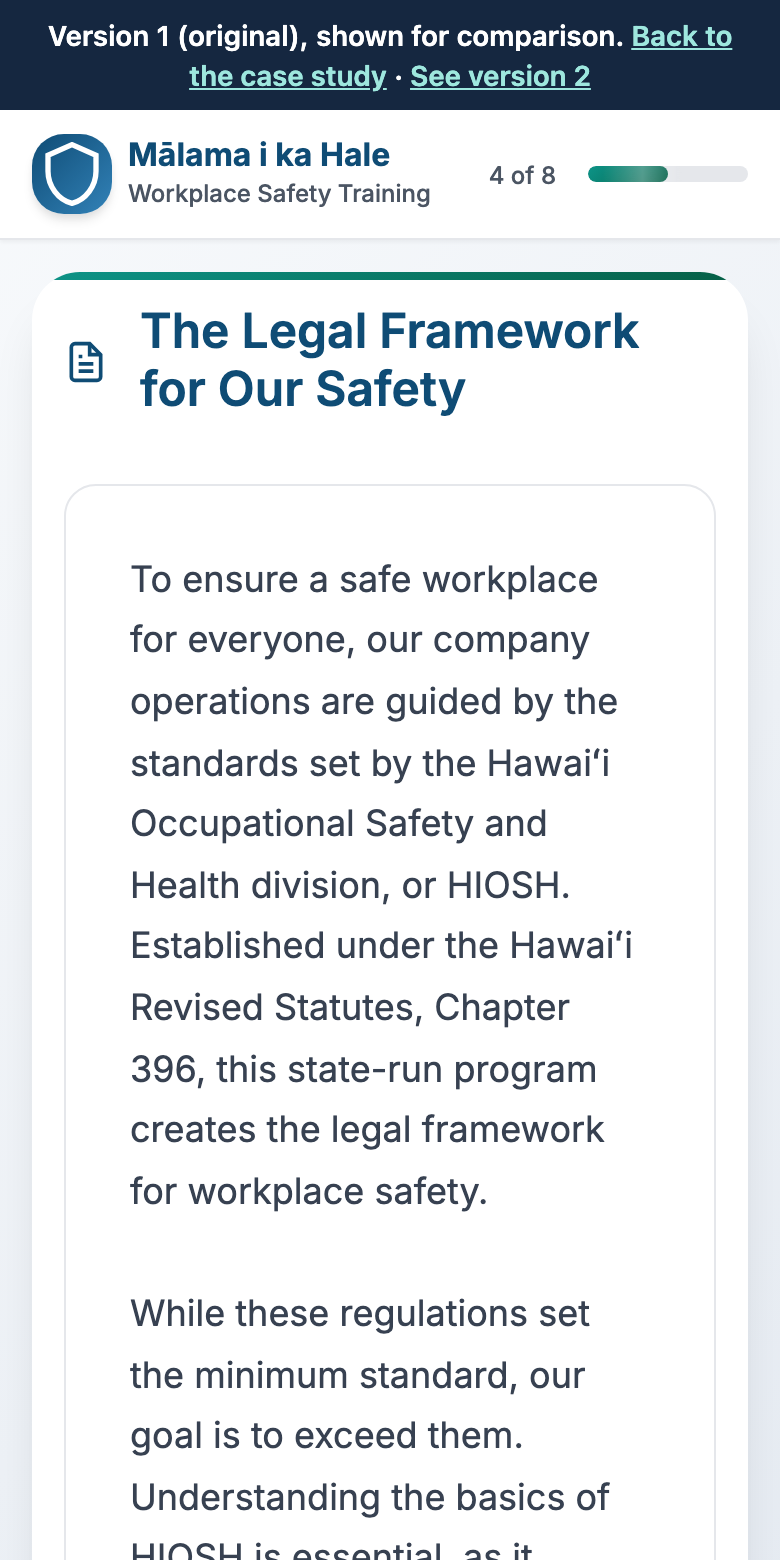
Version 1, at phone width

Version 1, screen 4 of 8. A white card titled The Legal Framework for Our Safety, filled with a paragraph about HIOSH and Hawaii Revised Statutes chapter 396. There is nothing to click but Next.
v1 · Screen 4 of 8. The law, before the learner has done anything.
Version 1, screen 8 of 8. The single quiz question about the General Duty Clause with four options. The correct option, highlighted in green, is much longer than the other three.
v1 · Screen 8 of 8. The only question. The right answer is the longest.

Version 2, on a computer

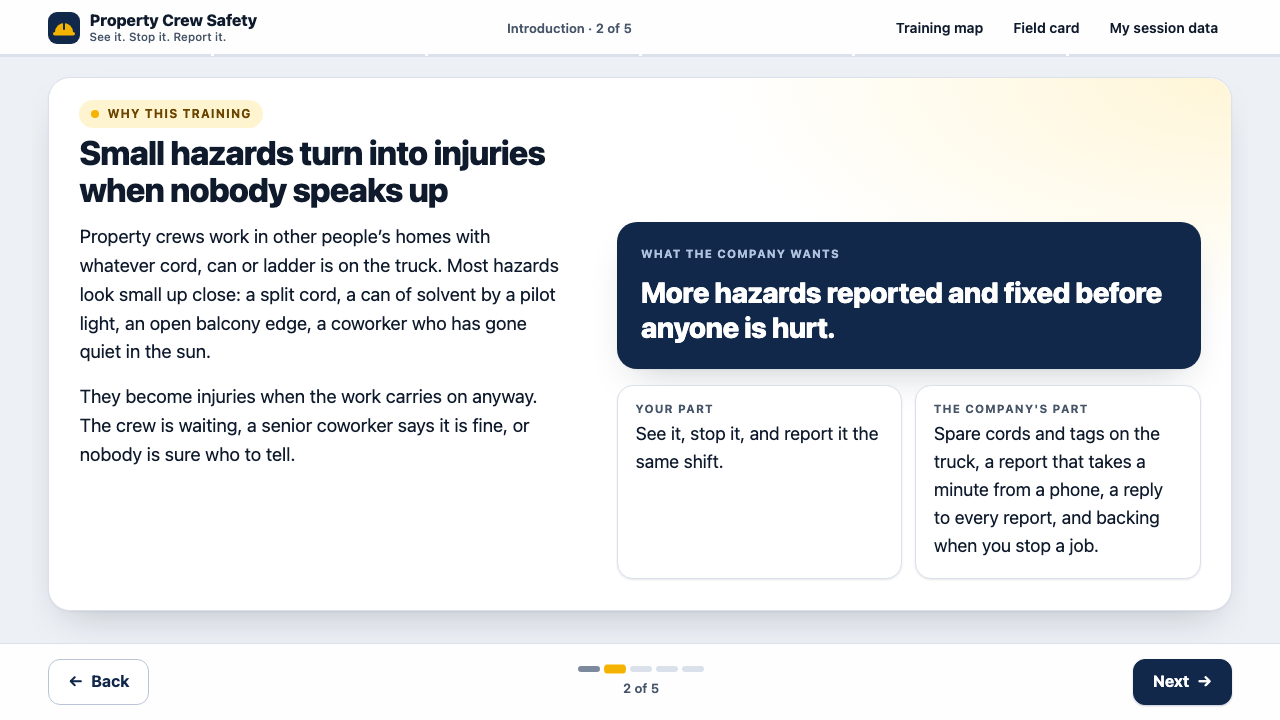
Version 2, introduction slide 2 of 5, on a computer. The title reads Small hazards turn into injuries when nobody speaks up. On the left, two short paragraphs about property crews working in other people’s homes. On the right, a navy card with the company’s goal, more hazards reported and fixed before anyone is hurt, and two smaller cards, your part and the company’s part. A Back button and a Next button sit in a bar at the bottom.
v2 · The business case. The introduction says why the company wants this before it teaches anything.
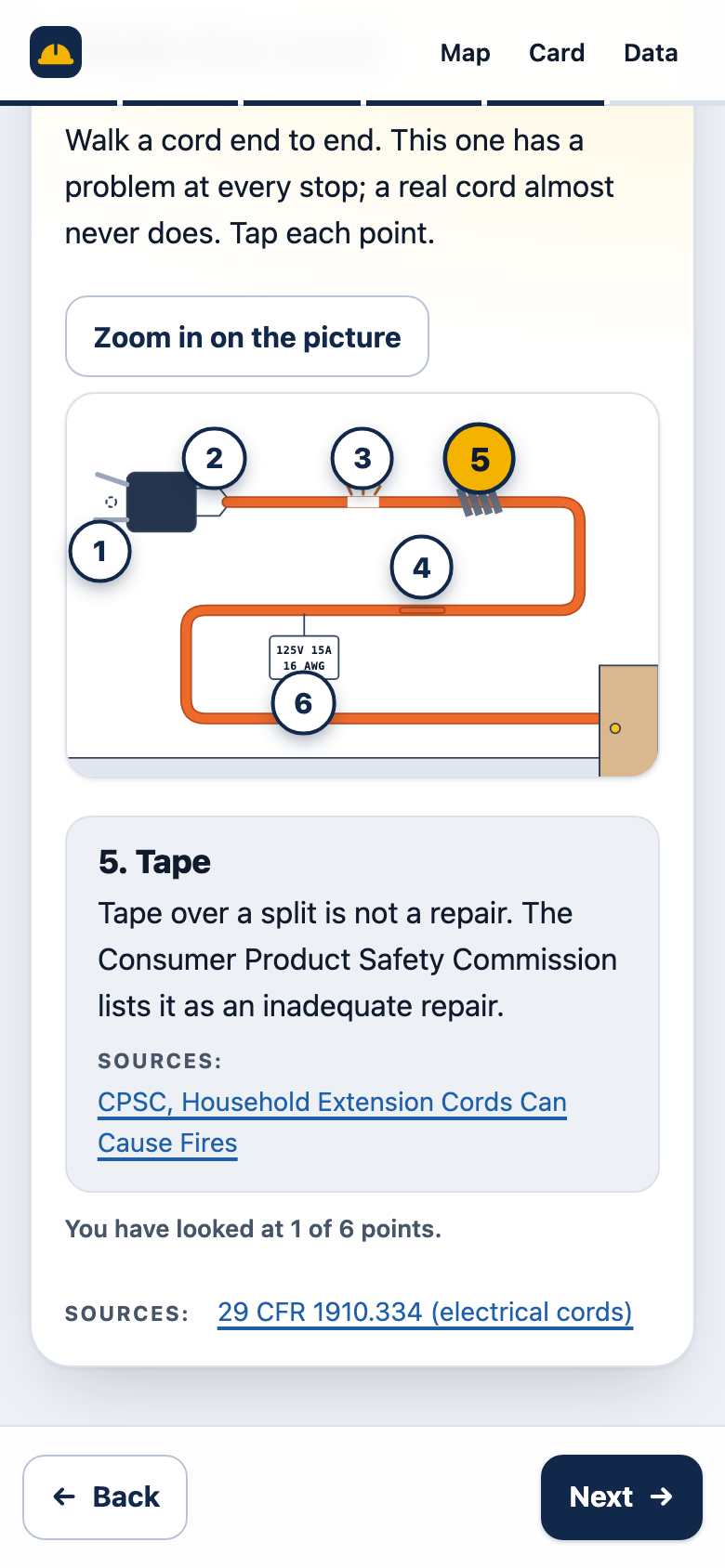
Version 2, lesson 1, on a computer. On the left, a drawing of one extension cord folded back on itself with six numbered points. Point 5, a wrap of tape, is highlighted. On the right, a panel says that tape over a split is not a repair and links to the Consumer Product Safety Commission.
v2 · Tap each point. The picture on the left, what the point means on the right.
Version 2, lesson 1, on a computer. Four rules for water and power on the left. On the right, a two-part drawing: normal, where power goes out along one wire and comes back along the other from a GFCI outlet to a work light, and a leak, where some power takes another way through a person standing in water. A banner says a GFCI cuts the power fast on a leak.
v2 · A diagram. How a GFCI works, drawn instead of explained in a paragraph.
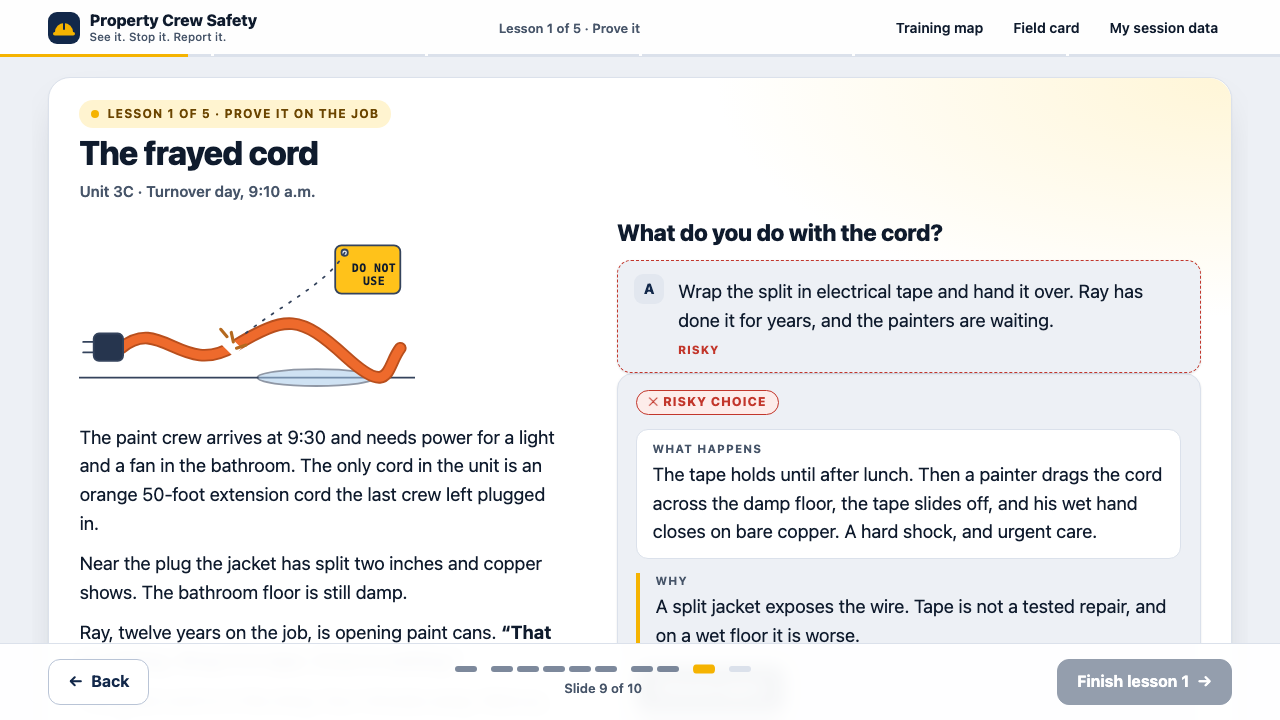
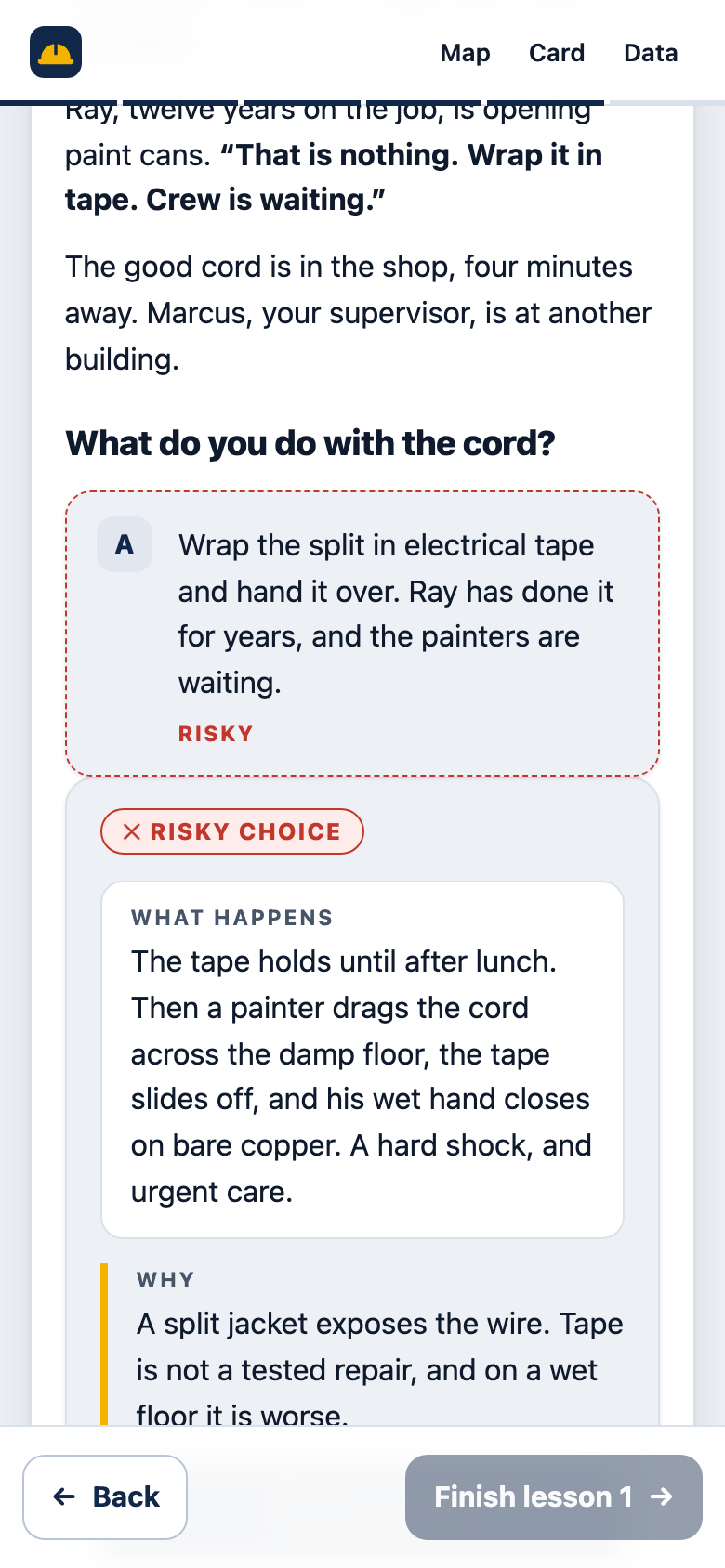
Version 2, a scene in lesson 1, on a computer. On the left, a small drawing of a split orange cord and the start of the story. On the right the learner has chosen to wrap the split in tape. That choice is marked risky, and a panel under it says what happens, a painter drags the cord across a damp floor and gets a shock, and why.
v2 · A scene. Make the call, then see what happens and why. The other choices step aside.
Version 2, lesson 1, on a computer. On the left, what happened in unit 5D. On the right, four boxes labeled Where, What, How bad and What I did, filled in by a learner, then the message as it will read with each part marked in its own color, and a Compare with a model button.
v2 · Write the report. Four boxes, a live message, a word check, then a model.
Version 2, after the test, on a computer. The heading says Not yet, 75 percent, with a red ring that is three quarters full, a four by three grid of the twelve skills, and on the right cards for the skills to look at again, each with a Review button. The Stop it cells for shock and fire are marked Dangerous.
v2 · The test result. Which skills are solid, which to look at again, and where an answer was dangerous.

Version 2, on a phone

Version 2 on a phone, lesson 1. The same cord picture with point 5 selected, and the explanation of the tape point stacked below it. Back and Next buttons sit at the bottom.
Phone · Tap each point. The same slide, stacked.
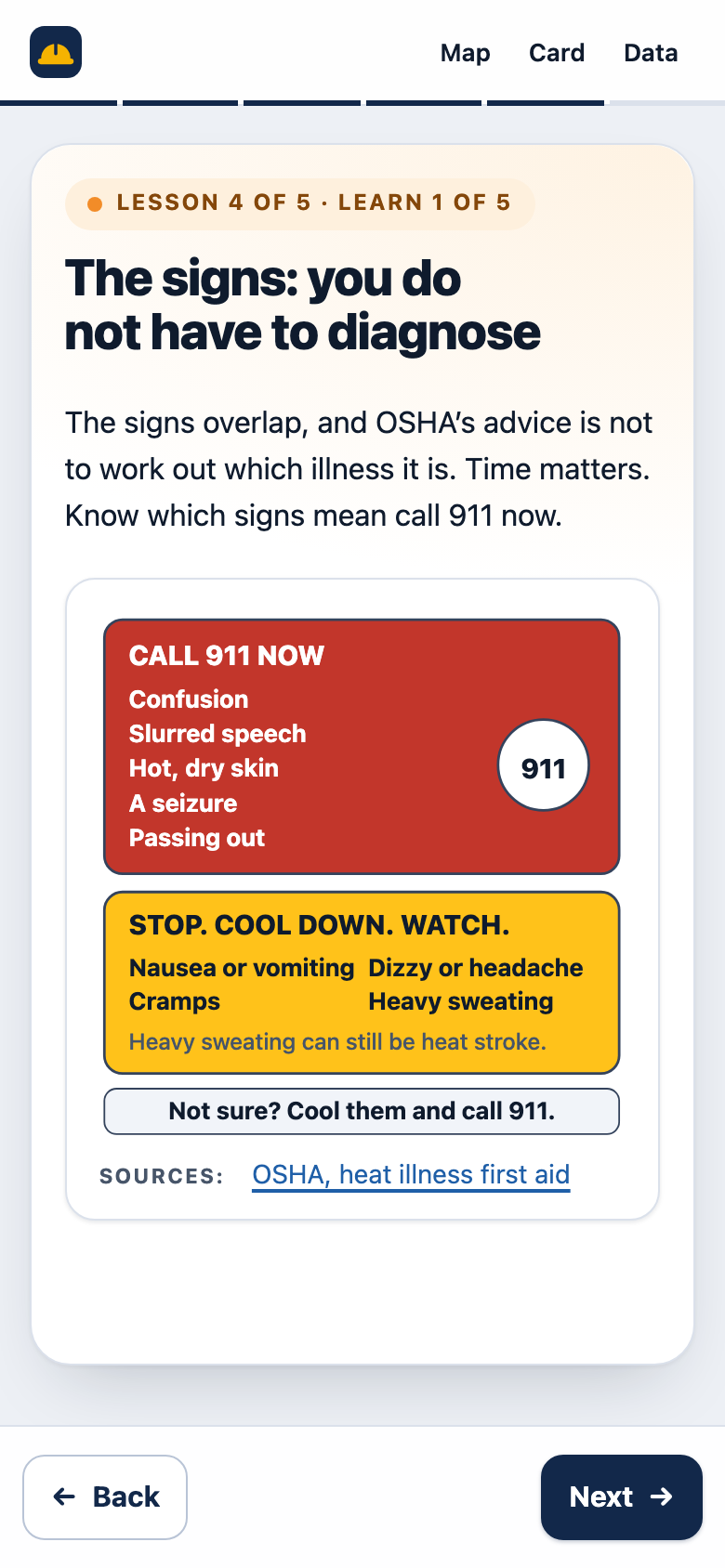
Version 2 on a phone, lesson 4. A red box titled Call 911 now lists confusion, slurred speech, hot dry skin, a seizure and passing out, beside a circle with 911. An amber box titled Stop, cool down, watch lists nausea or vomiting, dizzy or headache, cramps and heavy sweating, and says heavy sweating can still be heat stroke. A bar below says: Not sure? Cool them and call 911.
Phone · The heat signs. The tall version of the diagram.
Version 2 on a phone, a scene in lesson 1. The learner has chosen to wrap the split cord in tape. That choice is marked risky, and the panel below says what happens and why. The Finish lesson button at the bottom is greyed out until the best choice is made.
Phone · A scene. The next button waits until the best choice is made.

Format

Version 1Eight screens read in order, then one question.
Version 2Five lessons, each: learn, practice, prove it on the job. Then a scored test. A five-slide introduction comes first. Slides with Back and Next on a computer, the same slides stacked on a phone.

What it teaches

Version 1How HIOSH is set up and who owes what. Nothing about what a damaged cord or an unprotected edge looks like.
Version 2What to look for, what to do, and how to report, for four hazards. 24 learn slides, 8 diagrams, 4 pictures to tap through, every fact linked to its source. The learner writes reports and answers pushback.

Questions and decisions

Version 11 recall question Real
Version 27 practice checks (one a card drill), 8 scene decisions, 2 write-your-own reports, 3 welcome-back questions from a pool of 12, and a 12-question test drawn from a bank of 32 Real

Pictures that teach

Version 1None. A captioned box on the title screen with nothing in it.
Version 2Eight diagrams and 18 icons drawn for the training, as inline vector graphics with a text description for each. Nothing is loaded from another site.

Navigation and motion

Version 1A Next button and progress dots that a keyboard cannot reach. Nothing moves.
Version 2A Back and Next bar that stays put, the arrow keys, and ticks for where you are in the lesson. Text, pictures and answers come in over about two seconds; a click skips it, a switch in the header turns it off, and it stops if the device asks for less motion.

Where the law sits

Version 1Screens 4 to 6 of 8, before the learner does anything.
Version 2Inside the lesson or scene that needs it, with a link to the source.

How the learner is assessed

Version 1One multiple-choice question. The correct answer is the longest option.
Version 2A scored test of 12 questions, one per skill, in new situations, with an 80 percent mark, no dangerous answers, answers hidden until you pass, and a grid of what to look at again.

Feedback

Version 1“That’s right” or “Not quite,” plus a sentence.
Version 2In scenes: what happens, then why, and a weak choice can be retried. In practice: the reason. In the test: nothing until the end, then the grid and a link back to the lesson page.

Time

Version 1The README says 15 to 20 minutes. Not measured.
Version 2About an hour in six sittings, from a word count and a time model (64 minutes, 54 to 72 depending on reading speed). Projected

Record of what happened

Version 1Says “Your completion has been recorded.” Nothing is recorded.
Version 2Progress saved in the browser. Each answer saved as an xAPI-style statement, viewable in the training and labeled as a demo.

Legal accuracy

Version 1Of 13 legal claims checked: 8 hold up, 2 are wrong as written, 3 could not be verified. Real
Version 2Each claim traced to primary text.

Keyboard and screen reader

Version 1Progress dots are not reachable by keyboard, and in a keyboard test a custom Tab handler skipped focusable elements.
Version 2Native buttons, fieldsets and radio groups. Pictures are described in text and their points and tap areas are real buttons. The back button and a reload both work. See the accessibility line under Results.

Look

Version 1A stock course template: white card, blue gradient, an empty captioned box on the title screen.
Version 2A clean slide look: white cards on a cool stage, thin outlines, a color for each lesson. Built for a computer and for a phone in sunlight.
Try version 2   Open version 1

Process artifacts

The working documents

Each one opens as a page and downloads as plain text. Together they show the path from the gap to the build.

  • Needs analysis

    The business problem, why v1 wouldn’t change behavior, and a root-cause check on each gap.

  • Action map

    Goal, behaviors, what is taught, practiced and tested, what the company must do, and what was cut.

  • Objectives

    Ten performance objectives for the job, and the smaller objectives each lesson teaches.

  • Design document

    Audience, how the training teaches, the test design, tone, accessibility plan, technical design, and what was cut.

  • Storyboard

    Every screen: the on-screen text, the learner’s action, feedback for each answer, every test version with its scoring flags, and developer notes. Generated from the build data.

  • Evaluation plan

    How to know it worked, on LTEM tiers with a Kirkpatrick crosswalk, naming the data at each tier.

  • Legal and safety sources

    Every HIOSH, HRS, HAR, OSHA and CPSC claim in v1 and v2, its primary source, and whether it was verified.

  • Field card

    The one-page printable card the training hands off to: the whole 12-skill grid, the four-part report, who to call, and a panel to write a report and send it from your own phone.

Architecture: how the training is built

Content lives in two data files. The engine reads them, the tracking records each answer, and a script generates the storyboard from the same files. Three checks stand between drafting and release.

Architecture of the training A top-to-bottom flow. A human review gate feeds content.js and test-bank.js, the content files. A source-check gate feeds the engine, made of app.js and its helper files. The engine runs in the learner’s browser, where tracking.js writes one statement per answer to localStorage, which feeds the session data panel. A dashed future box is an analytics dashboard using simulated data. From the content files a script also generates storyboard.md. An accessibility-check gate sits before release. Gate: Dean reviews content content.js, test-bank.jsLessons, checks, scenes, test items, sources gen_storyboard.jswrites storyboard.md Gate: each rule checked against its source app.js and helpersMap, lessons, blocks, questions, scenes, test The learner’s browserPhone or laptop. Works offline. tracking.jsOne statement per answer (xAPI style) localStorageThis browser only. Nothing is sent. Session data panelReadable list and JSON download Future:analytics dashboard,simulated data Gate: axe-core and keyboard checks
Rounded pills are human or automated checks. Solid boxes are files that exist. The dashed box is not built.

In words: a person reviews the content; every rule sentence is checked against its source; content.js and test-bank.js hold the content; app.js and its helpers run it in the learner’s browser; tracking.js writes one statement per answer to localStorage; the session data panel shows those statements. A script builds the storyboard from the content files. Accessibility checks run before release. A dashboard is a future project and would use simulated data, labeled.

What one tracked answer looks like

One statement from a test run of the training: a learner picks the risky option in lesson 1’s scene. It is real output from the demo, from a test session, not a learner. The identifiers are random.

{
  "id": "b0c53133-16c6-4798-adcb-edf2fb4d30fe",
  "actor": {
    "objectType": "Agent",
    "name": "Demo learner",
    "account": {
      "homePage": "https://portfolio.deanahlgren.com/workplace-safety/demo/",
      "name": "f82186d2-419d-49c5-aea3-2af3181c1d3d"
    }
  },
  "verb": {
    "id": "http://adlnet.gov/expapi/verbs/answered",
    "display": {
      "en-US": "answered"
    }
  },
  "object": {
    "objectType": "Activity",
    "id": "https://portfolio.deanahlgren.com/workplace-safety/demo/lesson-1/apply/decision-1",
    "definition": {
      "name": {
        "en-US": "Lesson 1 scene \"The frayed cord\", decision 1"
      },
      "type": "http://adlnet.gov/expapi/activities/interaction"
    }
  },
  "context": {
    "registration": "a7915114-5652-41bb-a282-e6d436d919f8",
    "extensions": {
      "https://portfolio.deanahlgren.com/workplace-safety/xapi/extensions/demo": true,
      "https://portfolio.deanahlgren.com/workplace-safety/xapi/extensions/stage": "apply",
      "https://portfolio.deanahlgren.com/workplace-safety/xapi/extensions/behavior": "B1",
      "https://portfolio.deanahlgren.com/workplace-safety/xapi/extensions/cell": "shock-stop",
      "https://portfolio.deanahlgren.com/workplace-safety/xapi/extensions/quality": "risky",
      "https://portfolio.deanahlgren.com/workplace-safety/xapi/extensions/attempt": 1,
      "https://portfolio.deanahlgren.com/workplace-safety/xapi/extensions/first-try": true
    }
  },
  "timestamp": "2026-10-01T23:09:54.577Z",
  "result": {
    "response": "a",
    "success": false
  }
}

The shape follows xAPI but has not been validated against a learning record store. The training labels its own tracking as a demo.

How AI was used

Claude Code, Codex, Gemini and local AI models were used at different steps of my process.

Results

None yet, and here is what I can say

Every figure below is labeled by what kind it is.

  • Hazard and near-miss reports per 10 workersNo baseline exists. The target is set from a 60-day baseline taken before launch.
    Projected
  • Time to complete: about an hour, in six sittingsFrom a word count of about 5,600 words in the lessons and the introduction and 1,100 in the test, read at 180 words per minute, plus time for each interaction: 51 minutes of lessons and 13 for the test, 64 in all. At 240 words per minute it is about 54 minutes; at 150, about 72. The first build said “about 40 minutes” and was wrong; the next count said about 90, it was cut to 62, and the introduction added two. Not timed with learners.
    Projected
  • Legal claims in v1 that held up: 8 of 13Checked against primary sources on 2026-09-29. Two were wrong as written and three could not be verified. See the sources log.
    Real
  • v2 build: a 5-slide introduction, 5 lessons, 24 learn slides, 8 diagrams, 4 tap-through pictures, 7 practice checks, 8 scene decisions, 2 write-your-own reports, 12 test questions from a bank of 32, 5 find-the-hazards picturesCounted from the build.
    Real
  • Best answer is the longest option: v1, 1 of 1; the second build’s test, 14 of 16; this build’s test, 8 of 24Counted with a script, by characters. On the 24 test items the keyed answer is also the shortest on 8 and in the middle on 8. Across all 49 single-choice sets in the training the keyed answer is the longest in 15, the shortest in 17 and in the middle in 17, and no longest option is more than 40 percent longer than the others.
    Real
  • Accessibility and motion checksaxe-core on 93 states of the training (every kind of slide, the introduction, the map, the test, the results, a review page and the session-data panel), at 375 and 1280 pixels wide: no violations. On the case study, the documents, the field card and the original (22 page runs): none serious or critical; the only findings are moderate, from the site’s shared footer headings and a missing landmark on the original’s banner. A keyboard-only run through the introduction, lesson 1 and its scene: all 31 focus rings showed, and the picture tap areas can be reached and toggled with Tab and Space. A motion check on 23 slides: four seconds after each one appears nothing is still moving or see-through, and a click finishes the motion at once. No horizontal scroll at 320 pixels, including during the slide-in. Not done: a screen reader on a real phone.
    Real

About the session data panel

The panel in the training shows records from whoever is using it, in their own browser. Nothing is collected and nothing on this page comes from it. It is a demo of the tracking that a dashboard project would use.

What would be measured

On the LTEM tiers: check, scene and test results by skill from the training’s own records, and an item analysis of the test; a supervisor ride-along and a report-writing task at 30 days; hazard reports per 10 workers, their completeness and their speed against the baseline; and, watched over months, injuries and first-aid cases. Each measure, its source and the decision it informs are in the evaluation plan.

Reflection

What I’d change, and what didn’t work

What didn’t work

  • The first build had no teaching. It went from a welcome to scenes and quizzed what a learner already knew. That was the biggest miss, and it was a design miss, not a polish one.
  • The best answer was the longest in most questions, again, and it was measured wrongly the first time. A word count said the test was fine. A character count showed the keyed answer was the longest on 14 of 16 items.
  • The module said “about 40 minutes.” The count said about 90. Nobody had counted, and it took a cut to get to about an hour.

What I’d change next

  • Pilot with five to eight workers on their own phones, thinking aloud, with a timer. The hour is a word-count figure; a pilot will say whether new crew finish in six sittings, and which pages to cut next.
  • Get a safety professional to confirm the practice steps and every “dangerous answer” flag, and check the HAR sections again.
  • Time the motion with real learners, with it off for half of them. It may help, and on a phone in sunlight it may only be noise.
  • Test with a screen reader on a real phone. The find-the-hazards questions and the diagram descriptions need it most.
  • Put real photographs of a GFCI outlet, a railing and an anchor point beside the drawings, from public-domain OSHA or NIOSH libraries, after checking each license.
  • Score a written report with a rater, human or model, instead of a word check, and put it in the test.
  • Add a second module for ladders and lockout, and a short path for supervisors on how to answer a report.
  • Add a service worker so the training reopens with no signal, not just keeps running.

The honest limit: the strongest fixes here are outside the training. Spare cords on the truck, harnesses and anchors on balcony jobs, a report channel that works from a phone, and a reply to every report will move the goal more than any screen I can build.

Hiring for instructional design or AI training?

Tell me about the role or the project, and what the people you train need to do differently.